
I keep a notebook on the workbench. Two pages of it are nothing but per-spool calibration values, written in pencil because they keep changing. Bambu PLA Matte black, flow 0.97. Polymaker PolyTerra grey, flow 0.99. eSun PETG translucent, flow 0.94, retract 1.1mm at 28 mm/s. The notebook exists because the OrcaSlicer defaults are sensible starting points, not destinations.
This guide is the digital version of that notebook. Per-material settings for every common FDM filament: PLA, PETG, ABS, TPU, PC, Nylon, the carbon-fiber blends, soluble supports, and the exotic stuff. Real numbers from manufacturer datasheets, the OrcaSlicer wiki, and roughly two years of personal printing. Updated against OrcaSlicer v2.3.2 (current stable build).
You’ll also find: how to add a custom filament profile properly, where the AMS RFID auto-detect actually works (and where it doesn’t), and the single biggest hygroscopic mistake people make.
The master cheatsheet
Use this as your starting-point reference. The values are ranges because every spool varies, but landing inside the range will get you a printable result on a generic 0.4mm direct-drive setup. Bowden retraction values are roughly 4 to 6 times higher than the direct-drive numbers shown.
| Filament | Nozzle | Bed | Cooling | Retraction (DDE) | Speed (outer) | Max vol | PA (Klipper) | Enclosure? | Drying |
|---|---|---|---|---|---|---|---|---|---|
| PLA Basic | 200-215°C | 55-65°C | 100% after L2 | 0.4-0.8mm @ 35-50 | 50-80 mm/s | 14-18 mm³/s | 0.025-0.040 | No | 50°C × 6h (optional) |
| High-speed PLA | 205-230°C | 55-65°C | 100% | 0.4-0.8mm @ 40-50 | 250-500 mm/s* | 22-32 mm³/s* | 0.020-0.035 | No | 50°C × 6h |
| Silk PLA | 215-230°C | 55-65°C | 30-50% | 1-2mm @ 30-45 | 40-60 mm/s | 8-12 mm³/s | 0.030-0.045 | No | 50°C × 6h (always) |
| PLA+ | 205-225°C | 55-65°C | 80-100% | 0.4-0.8mm @ 35-50 | 50-100 mm/s | 12-15 mm³/s | 0.030-0.045 | No | 50°C × 6h (eSun ships wet) |
| PETG | 235-245°C | 75-85°C | 30-50% (off L1-2) | 0.6-1.2mm @ 25-40 | 40-60 mm/s | 7-10 mm³/s | 0.045-0.070 | Optional | 65°C × 8h (always) |
| PETG-CF | 240-260°C | 75-90°C | 30-40% | 1-2mm @ 25-40 | 40-100 mm/s | 6-10 mm³/s | 0.040-0.060 | Recommended | 70°C × 8h (always) |
| ABS | 240-250°C | 100-110°C | 0-10% (off L1-3) | 0.4-0.8mm @ 35-50 | 40-80 mm/s | 8-12 mm³/s | 0.030-0.050 | Required | 75°C × 4h (optional) |
| ASA | 245-255°C | 100-110°C | 0% off L1 | 0.4-0.8mm @ 35-50 | 40-70 mm/s | 8-11 mm³/s | 0.030-0.050 | Required | 80°C × 4h |
| TPU 95A | 220-235°C | 40-60°C | 30-50% | 0.5-1.5mm @ 20-30 | 20-40 mm/s | 4-8 mm³/s | 0.05-0.08 | No | 55°C × 6h (always) |
| TPU 85A | 210-230°C | 40-50°C | 30-40% | 0mm or as low as possible | 15-25 mm/s | 1-2 mm³/s | 0.06-0.10 | No | 45°C × 6-8h |
| PC blend | 250-270°C | 100-110°C | 0-10% | 1-2mm @ 30-45 | 30-60 mm/s | 6-10 mm³/s | 0.025-0.045 | Required | 85°C × 4-8h (mandatory) |
| Pure PC | 270-310°C | 110-120°C | 0% | 1-3mm @ 30-45 | 30-50 mm/s | 5-8 mm³/s | 0.025-0.045 | Required | 120°C × 4-8h (mandatory) |
| PA (Nylon) | 240-280°C | 90-110°C | 0-30% | 1-3mm @ 25-40 | 30-50 mm/s | 6-10 mm³/s | 0.030-0.045 | Required | 80°C × 12h (mandatory) |
| PA-CF | 270-290°C | 90-110°C | 0-20% | 1-3mm @ 25-35 | 30-80 mm/s | 8-12 mm³/s | 0.025-0.040 | Required | 80°C × 12h (mandatory) |
| PVA | 200-215°C | 50-60°C | 30-50% | 1-2mm @ 30-40 | 25-40 mm/s | 3-5 mm³/s | 0.04-0.06 | No | 45°C × 12h (mandatory) |
| BVOH | 205-220°C | 50-65°C | 30-50% | 1-2mm @ 30-40 | 25-40 mm/s | 3-5 mm³/s | 0.04-0.06 | No | 60°C × 4h (mandatory) |
| Wood-fill PLA | 190-215°C | 50-60°C | 80-100% | 0.6-1.2mm @ 35-50 | 30-50 mm/s | 6-10 mm³/s | 0.030-0.050 | No | 50°C × 6h |
| Metal-fill PLA | 195-220°C | 50-60°C | 100% | 0.4-0.8mm @ 35-50 | 30-50 mm/s | 5-8 mm³/s | 0.030-0.045 | No | 50°C × 6h |
| Glow PLA | 205-220°C | 55-65°C | 100% | 0.4-0.8mm @ 35-50 | 30-50 mm/s | 5-8 mm³/s | 0.030-0.045 | No | 50°C × 6h |
* High-speed PLA needs a high-flow hotend (Bambu, Revo HF, CHT clones, Volcano) to actually achieve the rated speed. Stock V6 hotends will under-extrude past about 18 mm³/s regardless of what you set in the slicer.
Hardened nozzle warning: every carbon-fiber, glass-fiber, glow, sparkle, marble, wood, magnetic, and metal-filled filament needs a hardened nozzle. 0.4mm minimum, 0.6mm preferable. Brass nozzles wear visibly within 500g. OrcaSlicer’s filament profiles surface this via the required_nozzle_HRC field, which warns you if the hardness setting doesn’t meet the filament’s needs.
The hygroscopic ranking (and the mistake everyone makes)
Every filament absorbs moisture from the air. Wet filament prints with popping, stringing, blobs, milky surfaces, and weak layer adhesion. The single most common AI-generated guide claim, “TPU is more hygroscopic than PETG”, is wrong.
Real-world ranking, fastest to slowest absorption rate:
- Nylon (PA, PA-CF, PA6-GF): absorbs up to 10% of its weight in 12 hours of room-air exposure. Print directly from a heated dry box if you want consistent results. Without drying, prints look fuzzy and pop continuously at the nozzle.
- PETG: absorbs 0.5 to 1% in 24 hours at 50% relative humidity. Wet PETG strings catastrophically and the layer surface looks slightly milky.
- PVA / BVOH: ridiculously hygroscopic. Will turn into spaghetti within hours of being out of a dry box if humidity is above 30%.
- PLA / ABS: roughly equivalent rates. Slower than PETG. Will absorb meaningfully over weeks but not hours.
- TPU: absorbs less than 1%, but matters more because TPU is already soft and any moisture-driven defects compound quickly.
- PEEK / engineering high-temp materials: least hygroscopic among common FDM filaments.
Drying temperatures from manufacturer datasheets (Bambu, Polymaker, eSun):
- PLA: 50°C × 6 hours
- PETG: 65°C × 8 hours
- ABS: 75°C × 4 hours
- ASA: 80°C × 4-6 hours
- TPU 95A: 55°C × 6 hours; TPU 85A: 45°C × 6 hours
- PC blends: 85°C × 4 hours; pure PC: 110-120°C × 4-8 hours
- Nylon: 80-95°C × 8-12 hours
- PVA: 45-50°C × 8-12 hours
The mistake everyone makes: assuming a sealed bag of new filament is dry. Most factory packaging is humidity-permeable enough that filament shipped during a rainy month from a non-AC warehouse arrives partially wet. eSun and Polymaker have both been called out on Reddit and on the Prusa forum for shipping wet PLA+. Always dry on receipt for hygroscopic materials.
PLA: standard, high-speed, silk, and the +/Pro tier
PLA Basic is the default first stop. OrcaSlicer ships a “Generic PLA” profile and brand-specific PLA presets for Bambu, Polymaker, eSun, Overture, Hatchbox, and Sunlu. Wiki temperature range 180-220°C. Practical printing range much narrower at 200-215°C. Bambu PLA Basic typically lands at 210, Polymaker PolyTerra at 205. Bed 60°C is fine for textured PEI.
PLA wants aggressive cooling. It’s the only common material where you genuinely run 100% fan from layer 2 onwards. Bridge sag, overhang quality, and surface detail all improve linearly with cooling. The exception is the first three layers, where you want fan low or off for adhesion.
Common gotcha: stringing on PLA usually means the spool is wet, not that retraction is undertuned. PLA absorbs moisture more slowly than PETG but it absolutely absorbs. Dry first, retest, then tune retraction.
Bambu PLA Matte vs PLA Basic: Matte runs about 5°C hotter (210-230 vs 200-220) and lower max volumetric speed (10 vs 18 mm³/s) because the matting filler (essentially calcium carbonate) increases viscosity. Same retraction, same adhesion, similar PA. Don’t use the PLA Basic profile for PLA Matte; the speed will under-extrude.
High-speed PLA (PLA-HF)
Bambu invented this category with the X1 / A1 launch. The chemistry: lower-molecular-weight PLA blends, plasticisers (PEG or citrate esters), and nucleating agents that crystallise fast on the way out of the nozzle. Result: viscosity drops dramatically. The same hotend can push 24-32 mm³/s instead of 12-18.
Practical settings: 200-230°C nozzle (hotter for higher speed; H2D forum threads suggest 230°C for 600 mm/s inner walls), 60°C bed, 100% fan. Outer wall 250-300 mm/s, inner walls 400-600 mm/s on high-flow hotends, infill 600+ mm/s.
The catch: high-speed PLA needs a high-flow hotend. Bambu hotend, Revo HF, CHT clones, Volcano. Stock V6 won’t hit the rated speed; you’ll under-extrude. Pressure advance often runs slightly lower than standard PLA (0.020-0.035) because it flows so easily. Brands: Bambu PLA Basic (built for it), eSun ePLA-HS, Polymaker PolyTerra Pro, Sunlu Meta.
The gotcha that bites: people buy “high-speed PLA” then complain it under-extrudes. They didn’t recalibrate max volumetric speed, and OrcaSlicer is silently capping the print speed at the older slower volumetric limit. Always re-run the max volumetric speed test in OrcaSlicer’s calibration tab after switching to a high-speed filament.
Silk PLA
Uses TPE or TPU additives blended into PLA for the satin sheen. Behaves chemically more like a co-polymer. Higher temperature window (215-230°C), but slower print speed (40-60 mm/s outer wall). Most failure modes come from people running silk at standard PLA speeds. You need to drop print speed and bump temp.
Cooling: 30-50% only. Too much fan kills the gloss. Max volumetric speed lower (8-12 mm³/s) because the TPE softens the melt. Stringing is worse than PLA Basic by a meaningful margin; tune retraction up by 0.5 to 1mm.
Layer adhesion is weaker, so don’t use silk for functional or load-bearing parts. The pretty sheen only looks right with thicker walls (3-4 perimeters minimum). Brand quirks: Eryone Silk runs cooler (210-220°C); Polymaker PolyLite Silk runs hotter (220-230°C); SUNLU Silk sits in the middle.
Use OrcaSlicer’s “Silk PLA” filament type in the dropdown rather than “Generic PLA”. The Silk PLA flag automatically adjusts the cooling curve. Picking generic PLA over-cools the print and you lose the silk effect.
PLA+ / PLA Pro
eSun PLA+ is the canonical example, but Polymaker PolyLite Pro, Sunlu PLA Plus, and Overture PLA Pro all fit here. Chemistry: PLA blended with impact modifiers (often a small percentage of TPU or polycarbonate-like elastomer). Result: stronger, less brittle, slightly tougher; trades off some stiffness.
Settings: 205-225°C is eSun’s official range; community sweet spot 210-215°C. Bed 60-70°C. Print like normal PLA but treat it as more hygroscopic. eSun has a known reputation for shipping wet spools even when factory-sealed (multiple Reddit and Prusa forum threads). Always dry on receipt.
PLA+ holds threads and inserts better than PLA Basic. Functional prints like brackets, jigs, GoPro mounts benefit. Common pain point: people select “Generic PLA” for PLA+. It works but is suboptimal. Better path: duplicate Generic PLA, raise nozzle temp 5°C, save as “eSun PLA+”. Or import the eSun-supplied OrcaSlicer profile from their wiki.
PETG: the mid-strength workhorse
Wiki nozzle range 230-250°C, community sweet spot 240/80. Bed 70-85°C. The biggest PETG-specific pain point: it bonds too well to bare PEI. PETG can chip the PEI coating off the spring steel during release. Standard practice: thin layer of glue stick on textured PEI as a release agent. Do NOT print PETG on a Bambu Cool Plate without glue. The Bambu wiki specifically warns about this.
Cooling: 30-50%. Lower than PLA, higher than ABS. Off for layer 1 to 2.
Retraction: PETG strings noticeably more than PLA. 4-6mm at 25-40 mm/s on Bowden, 1-2mm direct drive. Max volumetric speed 7-10 mm³/s, lower than PLA because PETG is more viscous. Pressure advance 0.045-0.070, notably higher than PLA because of viscosity lag.
Drying is critical. PETG absorbs 0.5 to 1% moisture in 24 hours at 50% relative humidity. Wet PETG = popping, stringing, milky surface, weak layer bond. Dry at 60-65°C for 6 to 8 hours. The single most common PETG complaint on Reddit is stringing. The single most common cause is moisture, not retraction.
Bambu PETG-HF runs hotter (250-260°C) and faster (16-20 mm³/s). High-speed PETG additives mirror what Bambu did with PLA-HF. Common issue: pillowing tops because fan is too low. If top surfaces look wavy, push fan to 50% on top layers only.
PETG-CF
Carbon-fiber-reinforced PETG. Bump nozzle to 240-260°C, drop volumetric speed to 6-10 mm³/s, use a hardened nozzle. The Bambu PETG-CF TDS rates ≤200 mm/s; community profiles run it at 100-150 mm/s.
270°C upper temp is for high-speed printing only; default at 240-250 is fine. Drying is critical: 70°C × 8 hours, and store with desiccant. PETG-CF’s carbon fibers wick moisture worse than plain PETG.
ABS and ASA: enclosure mandatory
Both styrenic, both need enclosure, both warp catastrophically without one. ABS: 240-250°C nozzle, 100-110°C bed. ASA: 245-255°C nozzle, 100-110°C bed. ASA is the UV-stable cousin, same settings, doesn’t yellow outdoors.
Chamber temperature is the real story. 50-60°C is the documented sweet spot. Don’t push above 60°C unless you’ve checked the printer’s electronics tolerance. ABS warps because the polymer shrinks about 0.8% on cooling; any rapid temperature gradient causes layer cracks.
Cooling: 0 to 10% only. Off for first 3 to 5 layers. Pressure advance 0.030-0.050. Max volumetric speed 8-11 mm³/s.
Adhesion: glue stick or ABS slurry (ABS dissolved in acetone painted on bed). Always use a brim for parts wider than 50mm. Drying: ABS absorbs slowly. Dry at 75°C × 4 hours if it’s been open more than a few weeks.
Common issues: layer separation usually means chamber too cold or fan too high. Warping means the same. VOC smell is real; ABS releases styrene during printing. Ventilate or filter, especially around children and pets.
Don’t print ABS in summer in a non-AC room. Ambient humidity and ambient heat both cause issues. ASA equivalents (Polymaker PolyLite ASA, Bambu ASA, Prusament ASA) print identically, just slightly hotter.
TPU: flexible and frustrating
Flexible, frustrating, fantastic for gaskets, grips, and phone cases. TPU 95A nozzle 220-245°C, bed 40-60°C. Direct drive strongly preferred. Bowden tubes cause buckling on retraction.
Retraction is the killer setting. Too much, and TPU compresses inside the hotend and clogs. Too little, and you get strings everywhere. Direct drive: 0 to 1mm at 35-45 mm/s. Bowden: 0.5 to 1.5mm at 20-30 mm/s.
Print speed: 30-60 mm/s direct drive max, 20-30 Bowden, can ramp to 70-90 once tuned. Cooling 30-50%. Max volumetric speed 2-5 mm³/s for 95A on a 0.4mm nozzle. This is the hard ceiling.
Pressure advance is high (0.04-0.08) because soft filament has lots of mechanical give in the column. TPU is hygroscopic. Dry 50-60°C for 4-8 hours. Softer durometers (85A) absorb more and drying hotter risks fusing on the spool.
Adhesion: textured PEI works without glue; smooth PEI use a tiny bit of glue or you’ll fuse. No enclosure needed.
Common issues: clogging mid-print means retraction too aggressive. Under-extrusion means volumetric speed set too high. Spaghetti from the spool not feeding smoothly means drag from the holder; use a low-friction roller. Bambu TPU 95A HF improves volumetric speed to 8-10 mm³/s.
NinjaFlex / NinjaTek 85A is even softer. Run at 220°C and 15-25 mm/s only. Direct drive only. Most consumer Bowden printers can’t print 85A at all.
PC: the highest-temp common engineering plastic
Wiki: 270-310°C nozzle, 100-120°C bed, 80-100°C chamber. Most consumer hotends top at 300°C, so verify yours. Polymaker PolyMax PC and Bambu PC most popular.
Enclosure mandatory. PC’s glass transition is 145-150°C and it shrinks dramatically. PC blends (Bambu PC, PolyLite PC) drop temp to 250-270°C by adding a small percentage of ABS or PETG; much more printable on standard machines.
Cooling: 0 to 10%, off first layer. Retraction 1-3mm direct, 4-7mm Bowden. Max volumetric speed 6-10 mm³/s. Pressure advance 0.025-0.045 (similar to PLA, PC actually flows linearly).
Adhesion is the nightmare. PC sticks to glass at 110°C bed, but it sticks too well and chips the bed. Use glue stick (Magigoo PC, or PVA glue). Engineering plate or PEI Plus recommended.
Drying: mandatory. PC absorbs moisture aggressively. 85-120°C for 4-8 hours. Wet PC = explosive popping at the nozzle and milky / foamy prints.
Common issues: warping even in enclosure (run brim 8-10mm wide), cracking on cooling (raise chamber temp), nozzle drool because PC doesn’t snap-back like PLA. Don’t bother with this on an open-frame Ender unless you’ve enclosed it. Best on Voron, Bambu X1C, Qidi X-Max, or Prusa XL with chamber.
Nylon (PA) and the carbon-fiber blends
Tough, abrasion-resistant, flexible-ish, and the most hygroscopic common filament. Wiki: PA6 230-260°C, PA12 225-260°C, bed 90-110°C, chamber 70-100°C.
Drying is non-negotiable. Nylon absorbs up to 10% of its weight in water within 12 hours of being out of a dry box. Print directly from a heated dry box at 70-80°C. If you don’t, expect bubbles, popping, fuzzy surfaces. Drying schedule: 80-95°C for 8-12 hours before first use.
Cooling: 0-30%. Adhesion: PA-specific build plate (Bambu Engineering Plate), or glue stick on PEI. Garolite / G10 is the gold-standard surface but few consumer printers ship it. Retraction 1-3mm direct, 4-7mm Bowden. Pressure advance 0.030-0.045. Max volumetric speed 6-10 mm³/s. Print speed 30-50 outer, 60-100 infill.
Pain points: layer adhesion failures usually mean wet filament, not temperature. Warping on long parts means chamber not warm enough. PA prints under-extruded for the first 30 minutes if the room is cold (filament hasn’t equilibrated).
Brand quirks: Bambu PA-CF actually contains some glass fiber too, hence “PAHT-CF”. Polymaker PolyMide PA6-GF is glass-only. eSun ePA is a softer PA12 that strings less. Common practice: print, immediately seal the part in a vacuum bag with desiccant. Dimensional accuracy of unsealed nylon parts changes over weeks as they re-absorb moisture.
PA-CF / PA6-GF
Carbon-fiber or glass-fiber reinforced PA. Used for jigs, fixtures, drone frames, GoPro mounts. Stiffer than plain PA, less ductile.
Hardened nozzle mandatory. CF is abrasive and will eat brass in less than 500g of printing. 0.6mm hardened steel ideal; 0.4mm acceptable but clogs more.
Settings: 270-290°C nozzle, 90-110°C bed, chamber 70-100°C. Cooling 0-20%. Print speed 30-80 outer, 60-150 inner. Max volumetric 8-12 mm³/s.
Drying: same as plain PA (mandatory) but worse. The carbon fibers act as wicks. Bambu’s recommendation: 80°C blast oven 8-12 hours, OR X1 series heatbed at 90-100°C for 12 hours. Print direct from dry box.
Pressure advance 0.025-0.040. Adhesion: glue stick or Bambu Engineering Plate. Retraction 1-3mm at 25-35 mm/s.
Common pain points: nozzle clogs because of moisture spit plus CF; clean cold pulls every kg. Layer delamination from chamber being too cold. Surface finish slightly fuzzy from exposed CF strands; this is normal, not a defect.
All require an all-metal hotend. PTFE-lined hotends will degrade above 240°C.
PVA and BVOH: soluble supports
Used as soluble support material in dual-extrusion or AMS multi-color setups. Dissolves in plain water (PVA, slowly) or much faster (BVOH).
PVA: 200-215°C nozzle, 50-60°C bed. BVOH: 205-220°C nozzle, 50-65°C bed. BVOH prints more reliably because it has a wider thermal window and doesn’t carbonise as fast. PVA carbonises around 220°C; keep it moving, never pause with PVA hot in the nozzle.
Both are extremely hygroscopic. PVA must be dried 12 plus hours and printed from a dry box. Humidity above 30% RH while printing causes immediate failures (popping, blobs, oozing). BVOH similar but slightly more tolerant.
Print speed slow: 25-40 mm/s. Cooling 30-50%. Volumetric speed 3-5 mm³/s. Used as the support interface only, paired with PLA or PETG. Doesn’t bond well to PA or PC.
Cost is high ($60-100/kg). Common pain point: people buy a roll, leave it in the printer for a week, then complain it’s failing. They didn’t recognise it absorbed water.
BVOH (Verbatim, Formfutura) dissolves in 1-3 hours in tap water; PVA (eSun, Polymaker PolyDissolve) takes 6-24 hours.
The exotic blends: wood, metal, glow, magnetic
PLA-based blends with 10-40% filler particles. All abrasive enough to require hardened nozzle.
Wood-fill: 190-215°C, print cooler than standard PLA. Wood particles char above 220°C, giving burned-popcorn smell and clogging. Use a 0.5mm or larger nozzle. 0.4mm clogs constantly with chunky wood particles. Wood is extra hygroscopic. Brand examples: Polymaker PolyWood, ColorFabb WoodFill, Hatchbox Wood.
Metal-fill (bronze, copper, stainless): 195-220°C. Heavier (density 2-4× PLA), so reduce print speed to 30-50 mm/s and increase flow rate about 5%. Best aesthetic comes from post-processing with steel wool.
Glow-in-the-dark PLA (strontium aluminate filler): 205-220°C. The glow particles wear nozzles fastest of any common filament. Hardened or ruby nozzle mandatory. Don’t run continuous prints over 200g without checking nozzle wear.
Magnetic PLA (iron particles, Proto-Pasta): 200-220°C. Slightly conductive, definitely magnetic. Adhesion is normal.
All exotics: max volumetric speed 5-10 mm³/s (lower than PLA Basic); cooling 100% same as PLA; pressure advance 0.030-0.050. OrcaSlicer ships generic “PLA Wood” and “PLA-CF” filament types. Use those rather than “Generic PLA” so the slicer applies the right default settings (lower max vol speed, abrasion warnings).
Common pain point: clogs. Pull out the spool overnight, dry it, store with desiccant.
Filament storage: dry boxes, desiccant, and what actually works
Drying once is necessary. Storing well is what keeps the dried filament dry. The internet is full of dry-box advice; most of it is fine. Here’s what’s actually worth doing.
The cheap path: 5L food-grade airtight container plus 200g of indicating silica gel desiccant beads. Polymaker, Sunlu, and Amazon all sell them as “filament dry boxes” but a 5L Lock & Lock is the same thing for less. Reusable silica gel is the right choice. The orange-to-green indicating beads tell you when the desiccant is saturated; bake the beads at 120°C for 2-3 hours to regenerate.
The middle path: Sunlu FilaDryer S2 or Polymaker Polydryer at $50-80. Heated dry box with a hygrometer, prints from the box directly, and re-drying is a button press. Works well for PLA, PETG, ABS. The S2’s max temp is 70°C, so it can’t dry PA or PC properly.
The serious path: a converted food dehydrator. Cheap ($30 used on Facebook Marketplace), gets up to 95-105°C with the door cracked, dries any common filament including Nylon. Drill a hole for filament feed, run a PTFE tube to the printer. This is the home-shop solution for anyone printing PA-CF regularly.
The wrong path: buying a “filament dry storage box” that’s just a sealed container with one small desiccant pack. That’s storage, not drying. If your filament is already wet, sealing it next to a teaspoon of desiccant won’t fix it.
Test for wet filament without printing: shake the spool. If you hear a faint hiss when you accelerate the spool by hand, water vapor is escaping the polymer. Or extrude 50mm of filament cold (with the heater off in your firmware) and look for clear liquid bubbles. Or smell it; wet PLA smells slightly sweet, wet PETG smells like an old bandage.
Storage humidity targets per material:
- PLA, ABS: less than 30% RH (achievable with one fresh desiccant pack in a sealed container)
- PETG, TPU: less than 20% RH (needs aggressive desiccant or a heated dry box)
- Nylon, PVA: less than 10% RH (heated dry box mandatory; print directly from the box)
Which filament for which use case (decision matrix)
If you’ve ever stared at a Polymaker product page wondering which spool to buy, here’s the cheat sheet:
| Use case | Recommended filament | Why |
|---|---|---|
| First print, anything decorative | PLA Basic | Easiest, cheapest, no enclosure needed |
| High-detail miniature | Standard PLA at 0.12mm layers | Best surface detail; HF PLA blurs fine details |
| Large model fast | High-speed PLA on a high-flow hotend | Print speed 2× standard PLA without quality loss |
| Outdoor part (UV exposed) | ASA | UV-stable, won’t yellow or crack outdoors |
| Vapor-smoothable model | ABS | Acetone-smoothable for glossy mirror finish |
| Functional bracket / GoPro mount | PETG or PLA+ | PETG strongest, PLA+ easier to print |
| Phone case / gasket / shoe insert | TPU 95A | Flexible, durable, prints on most direct-drive printers |
| Heat-resistant tool (above 60°C) | PC blend or ABS | PLA softens at 60°C; PC stays stiff to 145°C |
| Drone frame, abrasion-resistant jig | PA-CF | Stiffness plus impact resistance |
| Multi-color art / model | PLA Basic plus PVA support if needed | Best color range, easiest multi-extruder behavior |
| Hidden internal parts (multi-color) | Cheap “wipe tower” PLA | Reduces purge waste cost on multi-color |
| Automotive / engineering prototype | PA-CF, PC, or ABS | Heat and chemical resistance |
The honest meta-point: 85% of hobbyist printing happens in PLA, and that’s fine. The exotic filaments are exotic for a reason. Save the PA-CF and PC for when you genuinely need their properties; the headache is real.
Adding a custom filament profile in OrcaSlicer
The default filament list covers about thirty brands but not every spool. Adding your own takes about two minutes:
- In the Prepare tab, find the Filament section in the right panel
- Click the gear icon
- Click “Add/Remove Filament” at the bottom of the dropdown
- Switch to the “Custom Filaments” tab
- Click “Create New”
- Fill in: Vendor, Filament Type (PLA / ABS / PETG / TPU / PA / etc), Serial (a display name like “eSun PLA Pro Translucent”), Base Profile (inherit from a similar existing profile), Compatible Printers
- Save
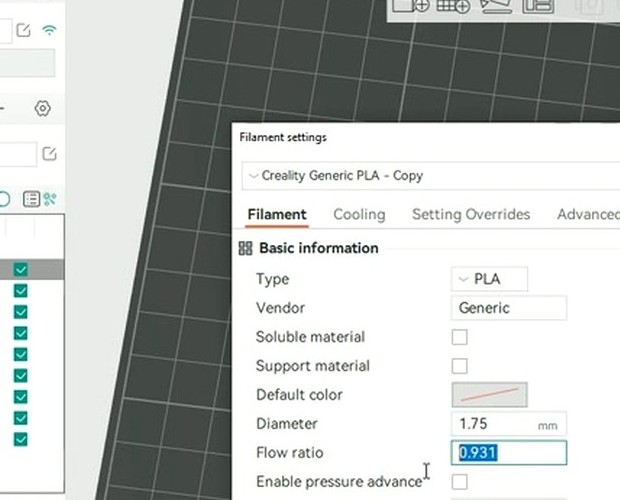
The profile appears in the dropdown immediately. Click the edit icon next to its name to tune settings: the Filament tab covers temperatures, diameter, flow ratio, density, and cost; Cooling has fan curves and overhang fan; Setting Overrides covers retraction; Multimaterial covers wipe tower behavior; Advanced lets you add custom start / end G-code per filament; Notes is freeform text.
To import a community-shared JSON profile (Polymaker, eSun, Bambu, Overture, and Sunlu all publish OrcaSlicer-compatible JSONs on their wikis):
- File → Import → Import Configs → select the .orca_filament file
- Or drop the JSON directly into
%AppData%\Roaming\OrcaSlicer\user\default\filamenton Windows,~/Library/Application Support/OrcaSlicer/user/default/filamenton macOS,~/.config/OrcaSlicer/user/default/filamenton Linux
The naming convention for community-shared filament profiles is Generic PLA @Orca 3D Fuse1@.json. Key fields the developers use: compatible_printers (which printer profiles this filament is allowed on), required_nozzle_HRC (the minimum nozzle hardness, surfaces a warning if user nozzle is softer), filament_density (g/cm³), filament_cost (money/kg, used for cost calc), filament_max_volumetric_speed (the calibrated ceiling).
AMS and multi-color filament handling
Bambu’s AMS, AMS Lite, and AMS 2 Pro embed RFID tags on Bambu-branded spools. The tags broadcast filament type, color, brand, drying state (AMS 2 Pro only), and remaining estimate.
Since the January 2025 firmware Authorization Control update, OrcaSlicer can no longer auto-read these tags. Today, OrcaSlicer in LAN plus Developer Mode shows the AMS slot count and lets you assign filament types per slot manually. RFID auto-detect, drying control, and remaining-amount sync from RFID are Bambu Studio exclusives.
For non-Bambu filament loaded into a Bambu AMS, this never worked anyway. You always assigned filament type manually. The OrcaSlicer workflow is identical for Bambu and non-Bambu spools now: type the filament in.
For non-Bambu multi-material (Prusa MMU2/3, BoxTurtle, Tradrack), OrcaSlicer treats the system as generic multi-extruder. Configure each tool’s filament independently.
Multi-color printing in OrcaSlicer:
- Load the model
- Use the Color Painting tool (the paint brush icon in the manipulation toolbar) to assign colors to model regions
- OrcaSlicer auto-generates a wipe tower
- Calculates purge volumes per color change
- Schedules tool changes in the slicing
The “Filament for Wipe Tower” setting can be set to a cheap PLA to reduce purge waste cost. The Process tab has a “Multi-material” section with all the wipe tower controls.
Filament cost in OrcaSlicer
Set density (g/cm³) and price (per kg) in the filament profile. Density typical values: PLA 1.24, PETG 1.27, ABS 1.04, PC 1.20, PA 1.13, TPU 1.21. Price is whatever you paid per kg.
The cost displays in the print preview summary as “material cost = filament_used × cost”. Doesn’t appear in the Send dialog itself, but visible in the right-panel print summary before sending. Used for statistics and comparison only; OrcaSlicer doesn’t track cumulative spending.
FAQ
Why does my PETG keep ripping the PEI off my Bambu Cool Plate?
PETG bonds too aggressively to bare PEI. Apply a thin layer of glue stick (Elmer’s Purple is fine) on the Cool Plate before each PETG print. The glue acts as a release agent. Bambu’s wiki specifically warns about this.
My PLA strings even with the right retraction. What’s wrong?
The filament is wet. PLA is less hygroscopic than PETG but it absolutely absorbs moisture. Dry at 50°C for 6 hours and retest before changing retraction values.
Do I need a hardened nozzle for PLA-CF?
Yes. Any carbon-fiber, glass-fiber, glow, sparkle, marble, wood, magnetic, or metal-filled filament. Brass nozzles wear visibly within 500g of printing.
What’s the difference between high-speed PLA and regular PLA?
Different chemistry. Lower molecular weight, plasticisers, and fast-crystallising additives. The result is much lower viscosity, which lets a high-flow hotend push 24-32 mm³/s instead of 12-18. Needs the right hotend; on a stock V6 you’ll under-extrude.
Why doesn’t the AMS auto-detect my third-party filament?
Only Bambu-branded RFID-tagged spools auto-detect, and even those don’t auto-detect on OrcaSlicer since the January 2025 firmware lockdown. Assign filament type manually per slot. Bambu Studio is the only path for full RFID auto-detect.
My ABS keeps cracking between layers. What’s the fix?
Either chamber too cold (need 50-60°C) or fan too high (need under 10%). Both cause uneven cooling, which separates layers as the polymer shrinks. Check both before changing other settings.
Can I print PC on a stock Ender 3?
No. Stock Ender 3 has no enclosure and no all-metal hotend rated for 300°C. PC blend variants (Bambu PC, PolyLite PC at 250-270°C) might work with an enclosure mod, but pure PC needs a Voron, Bambu X1C, Qidi X-Max, or similar.
Should the first layer be hotter than the rest of the print?
Yes, +5 to 10°C is standard practice across PLA, PETG, ABS, ASA, PA, and PC. Improves bed adhesion. OrcaSlicer applies this offset automatically across most filament profiles.
My TPU clogs mid-print. Why?
Retraction is too aggressive. TPU compresses inside the hotend if you pull too hard. Drop direct-drive retraction to 0-1mm and lower the retraction speed to 30 mm/s.
What’s the right pressure advance for PLA versus PETG versus ABS?
Roughly: PLA 0.025-0.040 (direct drive), PETG 0.045-0.070, ABS 0.030-0.050, TPU 95A 0.05-0.08. Bowden values run roughly 4-6× higher. Always run OrcaSlicer’s PA calibration per filament; the right value varies with brand and color.
Wrap-up
The default OrcaSlicer filament profiles work. They print Benchies, they print models. But they’re starting points, not destinations. The values in this guide are the ones experienced printers land on after running OrcaSlicer’s calibration suite per spool.
If you want the values for your specific spool to be precise rather than approximate, the next step is the calibration walkthrough. The full OrcaSlicer calibration guide covers the nine tests and the order to run them. If you’re new to OrcaSlicer entirely, start with the beginners guide or grab the install from the download page.