Microsoft Defender told me OrcaSlicer was Trojan:Win32/Wacatac.H!ml last month, my friend asked me three times if it was a virus, and I had to walk him through a SmartScreen warning, a “damaged file” Gatekeeper message, and a “not an official website” note in OrcaSlicer’s own README before he agreed to use it. The short answer is yes, it’s safe. The longer answer is why every signal makes it look like it isn’t, and why that’s a separate problem from whether the slicer will actually wreck your PC.
I’ve been installing OrcaSlicer on Windows, macOS, and Linux machines since the 1.6 days, and I’ve watched it migrate from the SoftFever GitHub repo to the OrcaSlicer organization in November 2025. I’ve seen the AV false positives evolve from Norton in 2023 to Wacatac.H!ml in early 2026. None of those flags ever pointed at real malware. They pointed at something more boring: an unsigned installer from a pseudonymous maintainer who hasn’t bought a code-signing certificate. That’s the whole story, and the rest of this article unpacks it with the receipts.
Quick disclosure before we go further. orcaslicer.net (the site you’re reading this on) is a third-party content site. We’re not the official OrcaSlicer project. The project’s own home is orcaslicer.com, and every official binary lives at github.com/OrcaSlicer/OrcaSlicer/releases. We don’t host the installer here. Every download button on this site points to that GitHub releases page. What we do is write the guides, calibration walkthroughs, and per-printer setup help that the official docs don’t always cover, in the same spirit as the third-party guide sites that exist for VLC, Blender, or OBS. That’s the trust signal we can honestly offer you: we’re not asking you to download anything from us, and we’re being upfront about who we are. The OrcaSlicer project warns about non-official sites because some of them bundle adware or ship outdated, modified binaries. We do neither. If that disclosure still makes you uneasy, hit the GitHub link and ignore the rest of this page. I’d rather you do that than feel misled.
Table of contents
- Why the scary warning showed up and what it actually means
- The trust stack: how open source makes OrcaSlicer auditable
- What VirusTotal actually shows (and why Wacatac.H!ml keeps appearing)
- What’s actually inside the OrcaSlicer installer
- The bambu_network plugin: the one honest gotcha
- How to verify your download in 60 seconds
- Fake OrcaSlicer sites: the real safety risk
- Has OrcaSlicer ever shipped malicious code?
- Quick safety checklist before you install
- FAQ
Why the scary warning showed up and what it actually means
If you landed here because your browser or your OS just yelled at you, let me describe what probably happened. On Windows, you double-clicked OrcaSlicer_Windows_Installer_V2.3.2.exe and a blue box appeared saying “Windows protected your PC” with “Unknown publisher.” On macOS, you opened the DMG, dragged the app to Applications, double-clicked it, and got “OrcaSlicer cannot be opened because Apple cannot check it for malicious software.” On either OS, your antivirus may have piped up too with something like Trojan:Win32/Wacatac.H!ml or a Norton “Heuristic” verdict.
None of those messages are about the contents of the OrcaSlicer binary. They’re about who paid for what.
SmartScreen, per Microsoft’s own developer docs, flags any executable that hasn’t built up “enough reputation” through downloads signed with a valid Authenticode certificate from a known publisher. A standard Authenticode cert from Sectigo runs around $215 per year. DigiCert charges closer to $500. EV certs that skip SmartScreen on first install run $400 to $700+ per year. OrcaSlicer’s maintainer SoftFever has explicitly said this cost isn’t worth it for a free open-source project. So every fresh release triggers SmartScreen until enough people have downloaded and run that exact binary for Microsoft’s reputation system to age it in.
Gatekeeper on macOS is the same root cause with different paperwork. Apple’s Developer ID program costs $99 per year. Notarization sends every build through Apple’s automated malware scanner before it can launch cleanly. OrcaSlicer’s macOS builds don’t go through that pipeline. So Gatekeeper blocks them. On macOS Sequoia (15.x) and later, you can’t even right-click and Open anymore. You have to attempt the launch, get rejected, then go into System Settings, Privacy and Security, and click “Open Anyway.” It feels worse than it is.
Here’s the cost picture for any open-source project thinking about this:
| Certificate / program | Annual cost (approx.) | What it gets you |
|---|---|---|
| Sectigo standard Authenticode | $215 | Removes “unknown publisher” once reputation builds |
| DigiCert standard Authenticode | ~$500 | Same, with a more recognized CA |
| DigiCert EV code signing | ~$549 | Bypasses SmartScreen on first run |
| Apple Developer Program (notarization) | $99 | Gatekeeper opens the app without ceremony |
For a single solo maintainer publishing a free slicer, that’s $300 to $650 a year out of pocket just to make the OS stop yelling. It doesn’t make the code safer. It just makes the warning go away. So the reframe I want you to take away from this section: SmartScreen and Gatekeeper warnings are funding signals, not safety signals. Plenty of paid commercial software has shipped with real malware. Plenty of unsigned open-source software has been clean for a decade. Code signing is a trust shortcut for the operating system. It is not a content check.
The trust stack: how open source makes OrcaSlicer auditable
Okay, so signing tells you nothing. What does tell you something? This is the actual answer to “is OrcaSlicer safe,” and it’s where open-source software has a structural advantage over closed binaries you can’t see inside.
License: AGPL-3.0
OrcaSlicer is licensed under the GNU Affero General Public License version 3. The README states it verbatim. AGPL is the strongest copyleft license commonly used in this space. It legally requires that anyone who distributes a modified or unmodified build of the code also ship the source code, including any network-side modifications. If someone shipped a malicious build calling itself OrcaSlicer, they’d be obligated under AGPL to publish their source or be in violation of the license. That doesn’t physically stop a bad actor, but it gives the community legal grounds to issue takedowns when someone does. (The pressure-advance calibration pattern is GPL-3.0 separately, but the slicer itself is AGPL-3.0.)
The fork heritage
This is the part that often gets glossed over and shouldn’t. OrcaSlicer isn’t a fresh codebase that appeared out of nowhere in 2022. It inherits roughly 15 years of public scrutiny through its ancestry:
- Slic3r (2011, Alessandro Ranellucci, written for the RepRap community, fully open source)
- forked into PrusaSlicer (2016, Prusa Research, AGPL-3.0, the C++ rewrite that powers most of the desktop slicer ecosystem today)
- forked into Bambu Studio (Bambu Lab, AGPL-3.0 core with the optional closed bambu_network plugin)
- forked into OrcaSlicer (2022, SoftFever, AGPL-3.0)
Every node in that chain is open source. The slicing engine code in OrcaSlicer, the part doing the actual heavy lifting, has been read by thousands of contributors across the four projects. That’s a fundamentally different threat model from a closed proprietary installer maintained by people you can’t audit.
Active development, named contributors, real sponsors
The bug tracker is public. The release notes are public. The pull-request queue is public. Recent releases call out @Noisyfox and @igiannakas as exceptional contributors and credit dozens more by handle. The README lists QIDI and BigTreeTech as project sponsors. Both are real 3D-printing hardware companies whose brand value would take a hit if they were sponsoring malware. There’s also GitHub Sponsors, Ko-fi, and PayPal donation links with public backers lists. None of this is proof of safety on its own. What it shows is that the project is not a black box and not an anonymous account dropping binaries into the void.
The repo migration (November 2025)
One small detail worth knowing if you’re searching old forum threads: the repo moved from github.com/SoftFever/OrcaSlicer to github.com/OrcaSlicer/OrcaSlicer around November 2025. Both URLs still resolve and redirect correctly, but the new canonical home is the OrcaSlicer organization path. If a search result sends you to the SoftFever URL, that’s fine, it’s the same project. Just bookmark the new one.
Pseudonymous, not anonymous
SoftFever, the lead maintainer, uses a pseudonym. Third-party reporting (octoeverywhere among others) places them in Singapore. Their legal name isn’t publicly disclosed. I want to be honest about this: pseudonymous maintenance is a real concern in some threat models. But “pseudonymous with five years of public commits, a transparent issue tracker, named corporate sponsors, and code that anyone can audit” is a totally different risk profile from “anonymous Telegram account uploading an EXE.” Plenty of widely-trusted open-source projects have had pseudonymous lead maintainers. The structure of the project, not the legal identity of one person, is what makes the code auditable.
What VirusTotal actually shows (and why Wacatac.H!ml keeps appearing)
If you ran VirusTotal on the current 2.3.2 Windows installer, you probably saw a small number of red engines (typically zero to three out of seventy-plus) with names like Wacatac.H!ml, GenericRXAA, or Trojan.GenericPUA. I want to walk through why that pattern keeps happening on legitimate OrcaSlicer builds.
The most recent flag, reported in GitHub Issue #12923 on March 24, 2026, was Microsoft Defender flagging OrcaSlicer_Windows_Installer_V2.3.2.exe as Trojan:Win32/Wacatac.H!ml at download time. The user who filed the issue wrote in their own report: “This is probably a false positive but wanted to send the details to the devs.” That instinct was correct.
Wacatac.H!ml is Microsoft’s machine-learning heuristic class. The .H!ml suffix specifically means the detection came from a Defender ML model, not a definition match against a known sample. Security researchers and Microsoft’s own community forums consistently describe Wacatac.H!ml as having a very high false-positive rate, particularly on legitimate unsigned installers, developer tools, and game utilities. It’s Defender crying wolf based on patterns it learned from broadly similar files. Game modding tools get hit constantly. Open-source dev utilities get hit constantly. OrcaSlicer is a textbook case: unsigned installer, bundled compiled libraries, network code, installer compression. To a heuristic model trained on malware, that combination looks suspicious.
Here’s the recent history of false-positive flags so you can see the pattern:
| Issue # | OrcaSlicer version | AV engine + signature | Resolution |
|---|---|---|---|
| #2071 | v1.7.0 beta | Windows Defender, generic threat | False positive, no real malware |
| #4798 | v2.0 | Norton heuristic, deleting EXE | False positive, closed not planned |
| #8489 | v2.2 era | Chrome / Defender warnings | False positive |
| #8991 | v2.3.0 | VirusTotal “red” verdict | False positive, closed not planned |
| #12923 | v2.3.2 | Microsoft Defender, Trojan:Win32/Wacatac.H!ml | False positive (March 2026) |
None of those have resolved as actual malware. Every single one tracked back to heuristic ML detection on an unsigned installer.
My honest rule of thumb when interpreting a VirusTotal result on something like this:
- 0 to 2 hits, all named with ML or heuristic suffixes (
.H!ml,RXAA-NK,GenericPUA,Wacatac.B!ml): almost certainly a false positive on an unsigned binary. - 3 to 5 hits, mix of heuristic and named signatures: probably still false, but worth comparing the file’s SHA-256 against the GitHub-published binary.
- 5+ hits with specific named malware families (Emotet, AgentTesla, RedLine, Lumma, etc.): don’t run it. You almost certainly downloaded from somewhere other than the official repo.
I want to flag one specific honesty point. I’m not going to paste a “0/70 detections” screenshot in this article and call it proof. Detection counts move version by version, and reproducible claims require the file’s SHA-256 to be in the same screenshot. Scan it yourself, today, with the file you actually downloaded. If you see the pattern I described, you’re fine. If you see five engines naming Lumma Stealer, close the tab and download from GitHub instead.
What’s actually inside the OrcaSlicer installer
Full transparency about what you’re putting on your disk. The base Windows installer (around 80 to 110 MB compressed, expanding to roughly 250 to 400 MB once installed, depending on bundled printer profiles) contains:
- OrcaSlicer.exe (Windows), OrcaSlicer.app (macOS), or the AppImage on Linux. Main binary, compiled from the public source.
- OrcaSlicer.dll / orcaslicer.dll on Windows. Primary application library, compiled from public source.
- Qt runtime DLLs (Qt5Core, Qt5Widgets, etc.). Open-source UI framework used by thousands of applications.
- wxWidgets components. The open-source UI toolkit shared with PrusaSlicer.
- libslic3r. The core slicing engine inherited via the PrusaSlicer / Bambu Studio fork chain. Open source.
- Printer profile bundles. Plain-text JSON for every supported printer.
What’s not in the base installer: bambu_network.dll on Windows, libbambu_networking.so on Linux, and libbambu_networking.dylib on macOS. Those are downloaded on demand only if you opt into Bambu Lab cloud connectivity. That’s the next section.
The bambu_network plugin: the one honest gotcha
If I’m going to claim this article is honest, I have to talk about bambu_network. It’s the one component in the OrcaSlicer ecosystem that isn’t fully auditable, and pretending otherwise would damage everything I’ve said so far.
What it is. A closed-source shared library distributed by Bambu Lab that handles all proprietary communication with Bambu Lab printers. That covers LAN discovery, MQTT telemetry, cloud connectivity, camera streaming, OTA firmware updates, and file transfer. OrcaSlicer (and Bambu Studio) call into this library only when you want to print directly to a Bambu printer over the cloud or with full Bambu features.
Why it exists. Bambu’s printer protocol isn’t publicly documented. The cloud auth, encryption keys, and MQTT topic structure are proprietary. Open-sourcing the plugin would expose that protocol publicly. Bambu’s stated position is that this is a security perimeter decision. Whether you buy that is up to you.
Why it’s a legitimate concern.
- You can’t audit the binary. It’s closed source.
- Discussion #10323 documented a user finding “an extremely large number of connections being established to China and BambuLab” originating from
orcaslicer.dll, which Malwarebytes’ network module flagged. The community response was effectively: yes, that’s the Bambu plugin doing its job. The traffic isn’t malicious. It’s just Bambu’s cloud architecture being chatty. - Third-party network analysis (referenced by 3DBite among others) indicates the plugin opens outbound connections even when the printer is set to LAN-only mode in some configurations.
- The data collection scope of those connections isn’t publicly documented.
How to avoid it entirely.
- The plugin is optional and not bundled in the base installer. OrcaSlicer downloads it on demand the first time you click “Enable Bambu cloud” or set up a Bambu cloud printer.
- If your printers aren’t Bambu, you never need it.
- If you have a Bambu printer but use LAN-only mode with developer mode enabled, you can skip the plugin for some workflows, although recent Bambu firmware (January 2025 onward) made fully LAN third-party slicer integration harder. Our OrcaSlicer vs Bambu Studio comparison goes deeper into the plugin trade-off.
- A community drop-in replacement called open-bambu-networking exists, attempting to reverse-engineer the protocol cleanly. I’m not endorsing it, just documenting that it’s a thing.
The honest framing: the OrcaSlicer base download is fully open source. The optional Bambu cloud plugin is not. If that bothers you, leave it off. If you own a Bambu printer and want easy cloud printing, you trade source-auditable purity for convenience. That trade-off is real and worth knowing about.
How to verify your download in 60 seconds
If you want to skip the rest of this article and just confirm your specific file is the real one, here’s the practical checklist.
Step 1: Download from the right place
There are exactly two trustworthy sources, plus the project’s own website which links to them:
- github.com/OrcaSlicer/OrcaSlicer/releases (canonical, new org)
- github.com/SoftFever/OrcaSlicer (historical, still resolves and redirects)
- orcaslicer.com (the project’s own site, which links to GitHub for the binaries)
If you’re looking at any other domain to actually download the EXE, DMG, or AppImage, close that tab. That includes any domain (yes, including this one) that you don’t recognize as being one of those three. Our OrcaSlicer download guide goes through the exact assets and which file to grab for each OS.
Step 2: Check the SHA-256 hash
I’m going to be honest about a weakness here. OrcaSlicer does not publish SHA-256 hashes in its release notes. The feature request for this (Issue #7005) was closed as Not Planned. That’s a legitimate gripe and I won’t pretend otherwise. The workaround is that GitHub’s release API generates per-asset SHA-256 digests automatically. You can query them:
curl -s https://api.github.com/repos/OrcaSlicer/OrcaSlicer/releases/latest | grep digestThat returns lines like "digest": "sha256:abcd..." for each release asset. Compare against your local hash.
The local hash commands by OS:
Windows (PowerShell):
Get-FileHash .\OrcaSlicer_Windows_Installer_V2.3.2.exe -Algorithm SHA256macOS (Terminal):
shasum -a 256 OrcaSlicer_Mac_V2.3.2.dmgLinux:
sha256sum OrcaSlicer_Linux_AppImage_Ubuntu2404_V2.3.2.AppImage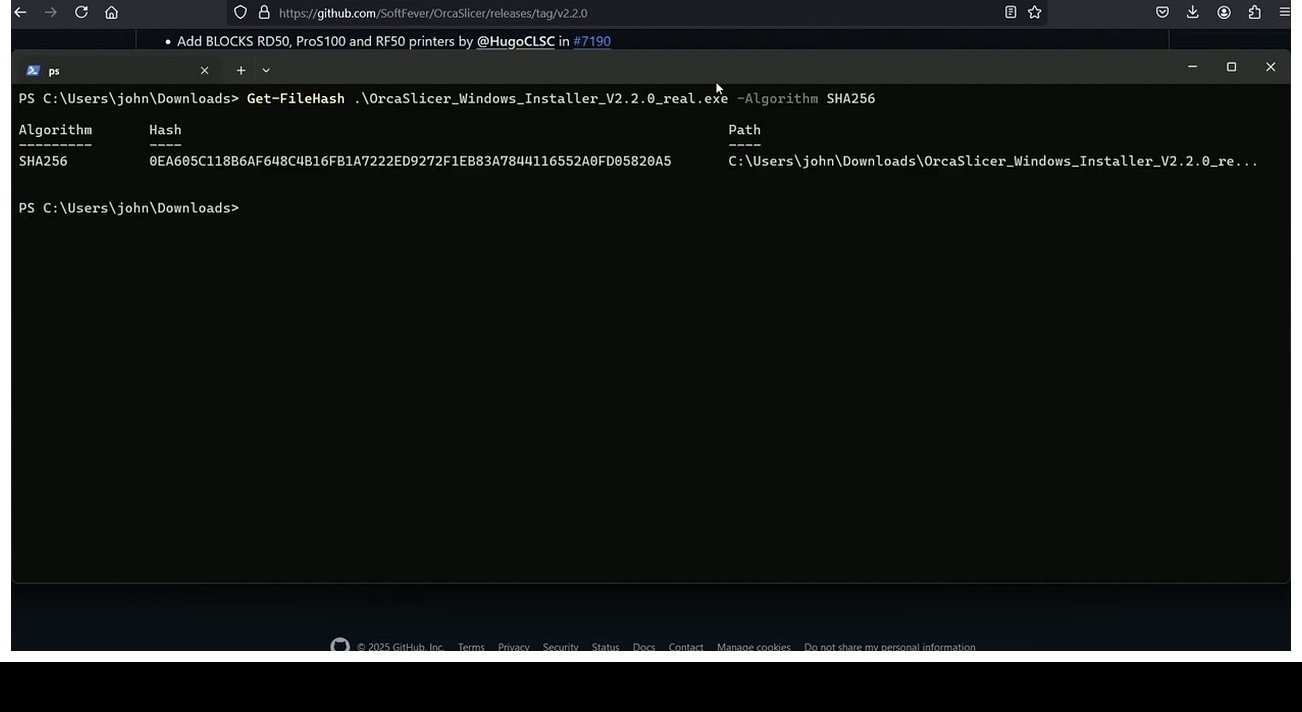
If the hashes match, you have the same file that GitHub is serving. Match means no man-in-the-middle, no swap with a trojaned build, no corruption in transit. That’s a higher bar than most paid commercial installers clear.
Step 3 (optional): Upload to VirusTotal
Drag the file to virustotal.com/gui/home/upload. Files under 650 MB go straight through. Expect zero to three heuristic detections, named with ML suffixes, on the patterns I described earlier. Be skeptical of any result that shows five-plus engines naming a specific malware family. That’s the threshold where I’d re-download from GitHub directly.
Step 4 (optional, for the paranoid): Build from source
Clone the repo, follow the build instructions in the wiki, compile from source. Time investment is real (a few hours, plus a working C++/CMake/wxWidgets toolchain) but you end up with a binary you produced yourself from auditable code. This is how genuinely security-sensitive users handle untrusted-source software. For most people, steps 1 and 2 are enough.
Once you’ve verified the download, our Windows install walkthrough covers the click-through-SmartScreen flow. On macOS, the Gatekeeper “Open Anyway” step is covered in detail in our macOS install guide.
Fake OrcaSlicer sites: the real safety risk
Here’s where I want to spend the trust capital I’ve built so far. The most common way real users get hurt isn’t OrcaSlicer itself. It’s downloading something that calls itself OrcaSlicer from a domain that isn’t the project’s.
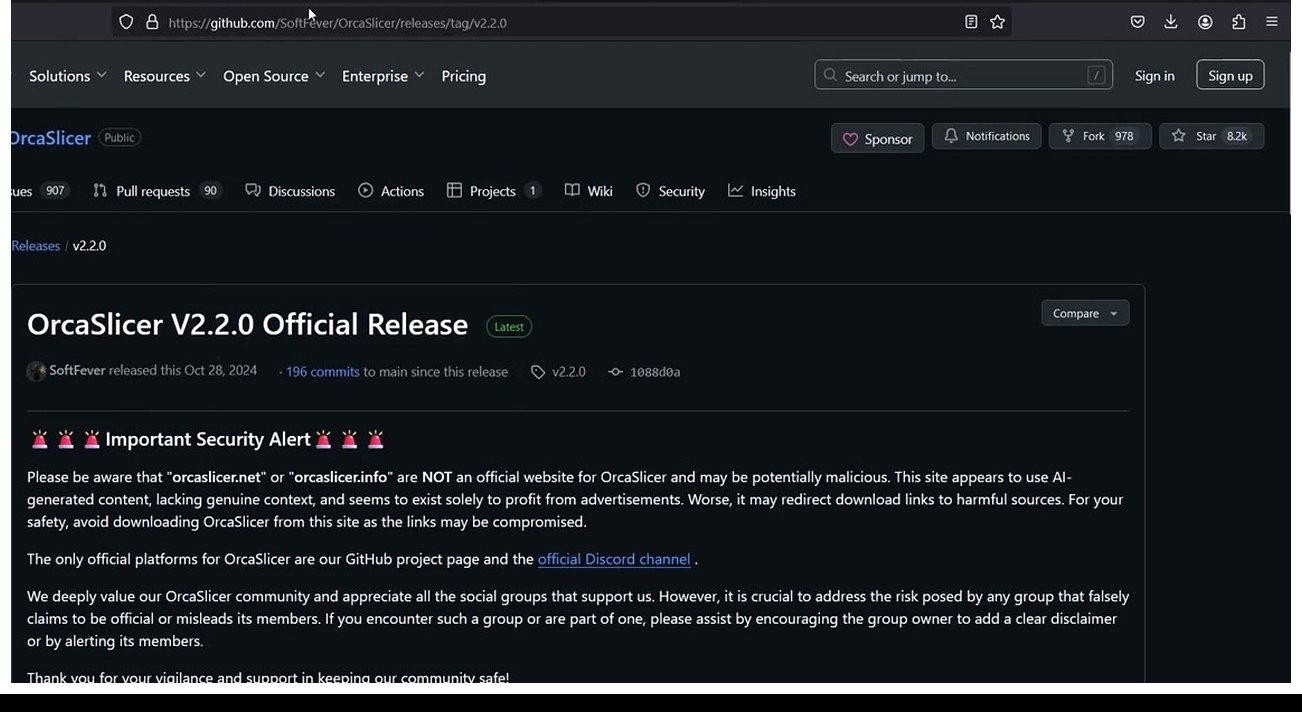
The OrcaSlicer project’s own GitHub Discussion #8252 explicitly names orcaslicer.com as the project’s site and points to GitHub releases as the canonical distribution channel. The README has a “Important Security Alert” section warning that several lookalike domains exist and may be unsafe.
The publicly flagged lookalike domains include:
- orca-slicer.com: confirmed by All About Bambu (September 19, 2024) as a fake site pretending to be official OrcaSlicer. Analyzed on ANY.RUN sandbox as exhibiting malicious activity.
- orcaslicer.info, theorcaslicer.com, orcaslicerz.com, orcaslicer.me, orcaslicer.uk.com: various unofficial mirror or lookalike domains seen in search results, none endorsed by the project.
- orcalibrate.com: Issue #9731 flags this as a dead-link virus-scan scam.

Now, the honest part. orcaslicer.net (the site you’re reading this on) is also named in third-party flag lists. I’ve already disclosed that we’re a third-party guide site, not the official project, and that we point every download CTA to GitHub. I’m calling it out again here because the spirit of this section requires it. The project’s warning about non-official sites is fair. The reason that warning exists is because some lookalike sites bundle adware or host outdated, modified binaries. We don’t do either of those things, but the reader has no way to know that without checking the actual download links. So here’s the test: every “Download OrcaSlicer” button on this site should land you on github.com/OrcaSlicer/OrcaSlicer/releases. If you ever click one and end up somewhere else, that’s the moment to email us or hit the GitHub link directly. That’s the standard we’re holding ourselves to.
There’s also an adjacent incident worth mentioning. The Printables.com “Open in OrcaSlicer” integration briefly routed through a domain that some users’ security tools flagged. That was a third-party integration issue, not an OrcaSlicer binary issue. But it shows the broader ecosystem has had hiccups, and it’s the kind of thing that primes people to assume the worst.
Has OrcaSlicer ever shipped malicious code?
Direct answer: as far as I can find on the public record, no. No published security advisory, no GitHub Security Advisory entry on the repo, no Hacker News or specialized security press incident covering a compromised OrcaSlicer release. The GitHub Issues flagging AV warnings (Issues #2071, #4798, #8489, #8991, #12923) all resolved as false positives or stale-closed without finding any actual malware in the binaries.
The SoftFever and OrcaSlicer org accounts on GitHub show no evidence of compromise. There are no retract-and-re-release events in the release history that would indicate a tampered build was caught and pulled.
This doesn’t prove a clean slate forever. Anyone telling you a piece of software is “always safe” is selling you something. What I can say is that four-plus years of public releases under public scrutiny haven’t surfaced a confirmed compromise of an official binary. That’s a meaningful track record.
One thing I want to disambiguate because it shows up in search results and confuses people: the Bambu Lab vs OrcaSlicer-bambulab incident from early 2025 into 2026. Independent developer Paweł Jarczak released a fork called OrcaSlicer-bambulab that restored direct-to-printer cloud printing for Bambu printers after Bambu’s January 2025 firmware update forced users through their Bambu Connect middleware. Bambu sent legal threats. Jarczak argued he was relying on AGPL-3.0 source code; Bambu accused him of reverse-engineering proprietary firmware. The fork was taken down. This is a licensing and printer-vendor dispute, not a malware incident. If you read about it and felt your gut tighten, that’s the disambiguation. It’s about who controls your printer, not about whether the OrcaSlicer binary will harm your PC.
For a wider look at OrcaSlicer’s feature set and how it compares to its ancestors, our 2026 OrcaSlicer review covers the slicer end to end, and our OrcaSlicer vs PrusaSlicer comparison walks through the philosophical differences between the two forks.
Quick safety checklist before you install
Bulleted, scannable, so you can come back to this when your friend asks.
- Download only from github.com/OrcaSlicer/OrcaSlicer/releases (or the historical SoftFever path, which still resolves).
- If the URL isn’t GitHub or
orcaslicer.com, don’t click. Including any link claiming to be a faster mirror. - Compare your file’s SHA-256 hash against GitHub’s release-API digest using the commands in the verification section.
- If SmartScreen blocks you on Windows: click “More info” then “Run anyway.” That is the intended path for unsigned installers.
- If Gatekeeper blocks you on macOS: open the DMG, drag the app to Applications, attempt to launch, then go to System Settings, Privacy and Security, and click “Open Anyway.”
- Skip enabling the Bambu cloud plugin unless you actually own a Bambu Lab printer and want cloud printing. The base slicer works fine without it for every other brand.
- Keep Windows Defender and macOS XProtect turned on. They catch real threats. They just also cry wolf on unsigned installers.
- Optional: upload to VirusTotal for peace of mind. Expect zero to three heuristic hits. Investigate only if you see five-plus engines naming specific malware families.
FAQ
Why is OrcaSlicer flagged as a virus by Microsoft Defender?
It isn’t flagged as a real virus. It’s flagged by Defender’s machine-learning heuristic, usually under the name Trojan:Win32/Wacatac.H!ml. That signature is documented (by Microsoft’s own community forums) to false-positive heavily on legitimate unsigned installers. OrcaSlicer fits the profile: unsigned, bundled compiled libraries, network code. Defender’s model doesn’t know it’s a slicer; it just sees the patterns. It’s a funding-and-signing artifact, not a content judgment.
Is Wacatac.H!ml on OrcaSlicer real malware?
No, in every reported case so far. Issue #12923 from March 2026 is the most recent. The user who reported it acknowledged in their own report that it was probably a false positive. The pattern matches every prior AV flag on OrcaSlicer (Issues #2071, #4798, #8489, #8991) and none of those resolved as real malware.
Can I trust SoftFever?
SoftFever is pseudonymous, based in Singapore per third-party reporting, with a five-year public commit history, named corporate sponsors (QIDI, BigTreeTech), and a transparent issue tracker. That’s a different risk profile than “anonymous account.” The structure of the project, AGPL-3.0 license, public source, named contributors, and active community, is what makes the code auditable. Whether you personally feel comfortable installing software from a pseudonymous maintainer is up to you, but plenty of widely-trusted open-source projects have operated this way.
Is the macOS version safe even though Apple blocks it?
Yes. The Gatekeeper block is because the build isn’t notarized. Notarization costs $99 per year through Apple’s Developer Program and pushes the binary through Apple’s automated scanner. OrcaSlicer doesn’t pay for that. That doesn’t mean the binary is unsafe; it means Apple hasn’t been paid to scan it. You can bypass the block manually through Privacy and Security in System Settings.
Should I skip the bambu_network plugin?
If you don’t own a Bambu Lab printer, yes, skip it. You’ll never miss it. If you do own a Bambu printer and want easy cloud printing, you have a real trade-off: the plugin is closed source and makes a lot of network connections to Bambu’s cloud and to endpoints in China. That’s documented in Discussion #10323. It isn’t malicious traffic, it’s just how Bambu’s cloud architecture works. Decide based on your own threat model.
Where do I get the real OrcaSlicer if not from orcaslicer.net?
From github.com/OrcaSlicer/OrcaSlicer/releases, or via orcaslicer.com, which is the project’s official site and which links to GitHub for the binaries. Every download CTA on this site (orcaslicer.net) points to that GitHub releases page. We don’t host the installer ourselves. If a button ever takes you somewhere else, that’s a bug worth telling us about.
Does OrcaSlicer phone home if I never enable Bambu cloud?
The base slicer makes update-check connections to GitHub for new release notifications and downloads printer profile updates from the project’s CDN. It doesn’t transmit your model files anywhere unless you specifically use a cloud feature. The heavy “many connections to China and BambuLab” pattern from Discussion #10323 is the bambu_network plugin doing its job. With the plugin disabled, that traffic goes away.
Closing
To wrap up plainly: yes, OrcaSlicer is safe to install. The warnings you’re seeing are signing-and-funding artifacts, not malware signals. The project is open source under AGPL-3.0, inherits 15 years of public scrutiny through its fork heritage, has named corporate sponsors, and has no record of shipping malicious code across four-plus years of releases. The honest caveats: SHA-256 hashes aren’t published in release notes (use the GitHub API as a workaround), the maintainer is pseudonymous (but five years of public commits is a different beast from anonymity), and the optional Bambu cloud plugin is closed source (leave it off if it bothers you). Download from github.com/OrcaSlicer/OrcaSlicer/releases, run the hash check, click through the warning, and go print something. Our download guide walks through the asset list per OS if you want a single page to bookmark.