
The first time under-extrusion really wrecked one of my prints, I spent four hours convinced my Z-axis was loose. I poked at belts, retightened eccentric nuts, ran a bed mesh, swore at my Ender, and only when I held a flashlight at a low angle did I see what was actually wrong: thin pinstripe gaps running between every single perimeter, like the slicer had decided to print stripes on purpose. The belts were fine. The bed was fine. The hotend was starving.
That is the thing about under-extrusion in OrcaSlicer. It rarely shouts. It whispers in symptoms that look like ten other problems, and most of us misdiagnose it at least twice before we land on the right fix. I have been printing on OrcaSlicer since the SoftFever fork days, I run a Bambu P1S and a Voron 2.4 next to a stubborn old Ender 5 Pro, and I have probably wasted more filament on bad flow calibrations than I want to admit publicly. So this guide is the ladder I actually climb when prints come out starved, in the order I climb it, with the math, the menus, and the real GitHub issue numbers behind the gotchas.
If you skim nothing else, skim Section 3 (the diagnosis ladder). The wet-filament and partial-clog causes account for the majority of the under-extrusion cases I see in Discord and on the OrcaSlicer issue tracker, and they are also the two fixes people skip while they crank flow ratio and make everything worse.
What under-extrusion actually looks like
Under-extrusion is the umbrella term for “the printer laid down less plastic than the slicer asked for.” That undershoot can be 2% (almost invisible until you side-light a top surface) or 30% (the print falls apart in your hand). What makes it confusing is that the same underlying cause can show up as five different cosmetic symptoms, and a fresh user almost always reaches for the wrong fix.
Here is the symptom list I run through in order of how often I actually see them on prints sent to me for diagnosis. Match yours to one of these before you change a single setting.
Gaps between perimeters (the headline symptom)
Adjacent walls do not fuse. You will see slivers of empty space between the outer wall and the second wall, often as straight pinstripes running parallel to the perimeter. Side-light it with a phone torch held at maybe ten degrees off the surface and the gaps pop visually. This is the canonical under-extrusion look. If you only see it on the first layer, that is not under-extrusion, that is first layer height (see our first-layer guide).
Top surface pinholes
The top solid layers do not close. You see the infill grid texture bleeding through what should be a clean top, or pinprick holes scattered across the surface. People reflexively crank “top shell layers” from 4 to 8 and the problem stays. The fix is upstream: the lines on each top layer are starved, so adding more starved layers does not help.
Parts that split along layer lines
Functional prints snap cleanly at a layer line under hand pressure. The plastic was laid down but did not have enough volume to weld to the layer below. If your benchies look fine cosmetically but your mounting bracket cracks at one specific layer, you are almost certainly under-extruding at that height.
Inconsistent line width along a single perimeter
Look at one continuous wall under a flashlight. If the line visibly thins, fattens, thins again as the toolhead moves, you have either intermittent slippage at the extruder or a partial clog. This one almost always pairs with a clicking extruder.
Banding in top surfaces
Long parallel grooves in solid fills. The grooves follow the infill direction, not the Z stack. That distinction matters: Z-banding follows the Z axis (lead screw wobble, eccentric Z motor), under-extrusion banding follows the infill angle. If you rotate the part 45 degrees on the build plate and the banding rotates with it, it is extrusion, not mechanical.
Missing fine details
Small text, fine ridges, gap fill between thin walls just do not print. They show up as dotted lines or simply blank space. Same root cause, different cosmetic outcome.
Under-extrusion vs over-extrusion vs gaps
This is where I see beginners flip the diagnosis the most. Over-extrusion and under-extrusion are opposite symptoms with opposite fixes, and a wrong call here just deepens the hole. Here is the contrast table I keep pinned in my workshop.
| Symptom area | Under-extrusion | Over-extrusion |
|---|---|---|
| Top surface | Pinholes, infill showing through | Rough, bumpy, “scrubbed” look |
| Perimeters | Visible stripe gaps between walls | Walls smear into each other, blobs |
| First layer | Filament looks thin, no squish | Elephant foot, bulging base |
| Corners | Sharp but starved, dotted | Ringing, blobs at direction change |
| Z seam | Open gap, visible vertical seam line | Zit or blob at the seam |
| Dimensions | Holes slightly oversized, walls slightly undersized | Holes undersized, walls oversized |
If your symptoms point at over-extrusion, hop over to the sibling article on blobs and zits. Everything below assumes you have confirmed under-extrusion.
A word on “gaps” specifically. OrcaSlicer 2.3.1 introduced a regression on thin walls roughly 1 to 2 mm wide where adjacent perimeters behave like separate shells rather than fusing. That is tracked as GitHub Issue #11394, and I cover it in its own section below because the fix is “roll back to 2.3.0 or wait for 2.3.2,” not “calibrate harder.”
Causes ranked by impact (the diagnosis ladder)
This is the spine of the article. I have it ordered by what causes the most under-extrusion cases I see across forums, Discord, and my own bench. Work top to bottom, not bottom to top. Most people land on a fix by step four.
1. Wet filament (the silent killer)
Moisture trapped in the filament flashes to steam inside the hotend. You get micro-bubbles in the melt, disrupted flow, and prints that look starved even though everything else is fine. Tell-tale signs include popping, hissing, or crackling sounds at the nozzle, visible steam in a dark room, and surface roughness that comes and goes within the same layer. PETG, TPU, nylon, PC, and PVA are the worst offenders. PLA is more forgiving but still affected after a few humid weeks on the shelf.
Fix: dry the spool. Typical temps are 45-55 C for PLA, 65 C for PETG, 80 C for nylon. A purpose-built filament dryer is worth the spend if you live anywhere humid. This is the cause I see missed the most, especially in winter when people put a humidifier in the print room.
2. Partial nozzle clog or hotend gunk
Burnt material, dust, or carbonised filament narrows the effective bore. Plastic still extrudes, just less of it. Listen for a “thunk-thunk” as the extruder skips and look at perimeters: if one wall looks consistently thinner than the others under a flashlight, that is your clog signature. Cold pull is the first hardware diagnostic and I cover the procedure in Section 7.
3. Flow ratio miscalibrated
OrcaSlicer ships every filament profile at 1.0 flow ratio. Per-spool variance can be plus or minus 0.05 even within the same brand and material, so a generic PLA profile against a thinner-than-spec spool will under-extrude on day one. Calibration is the fix, not cranking flow ratio blindly. Methods in Section 5.
4. Extruder gear slipping or chewed
Look under the printer for filament dust. That is the giveaway. The drive gear has grooves clogged with PLA crumbs and cannot bite, or it has chewed a notch into the filament and lost grip. PETG is notorious for this because it is slippery. Clean the gear with a brass brush, not steel.
5. Extruder tension wrong
Too loose, the gear slips. Too tight, the gear crushes the filament into a flat ribbon that then jams downstream. Bambu extruders use a fixed spring and rarely need adjustment. Open direct-drive extruders on Voron, Sovol, and Ender clones have an adjustable thumbscrew, and the sweet spot is usually a quarter-turn off “I can just barely feel the gear bite.”
6. PTFE tube wear
This bites Bowden printers and Bambu owners equally. On a Bambu X1 or P1S, both the AMS-to-extruder PTFE and the hotend-internal PTFE wear. Bambu’s own wiki recommends inspecting the AMS PTFE every two months. The hotend-internal PTFE liner is a consumable on Bambu and should be replaced when extrusion problems persist after a clean cold pull.
7. Filament diameter mismatch
Slicer assumes 1.75 mm. Real spools come in anywhere from 1.68 to 1.78. Even 0.05 mm of diameter error is roughly 6% volumetric error, which is enough to show as visible under-extrusion. Measure with calipers in five spots, 10 cm apart, average them, and enter the average in Filament settings.
8. Cold extrusion
Temperature too low for the material or for the speed you are running. Filament does not fully melt, backpressure rises, extruder skips. Easy to miss because it only shows up at high speeds where the dwell time in the melt zone is short. A temperature tower sorts this in a single print.
9. Speed exceeds hotend volumetric capacity (MVS)
This is the cause that bites people after they watch a YouTube speed-printing video and bump perimeter speeds to 300 mm/s. The hotend physically cannot melt plastic fast enough. Section 6 is the deep-dive.
10. Retraction restart length too low
After a long retract or a filament swap, the slicer’s de-retraction sometimes does not fully prime the nozzle. The first few millimetres of the next extrusion are starved. The extra_length_on_restart setting compensates. Set it conservatively (0.1 to 0.3 mm) because too much causes blobs at the line start.
11. Profile drift after an OrcaSlicer upgrade
New versions occasionally tweak defaults or remap settings. If you upgraded and prints regressed overnight, check Filament Flow Ratio and Print Line Width against your previous-version values before you change anything else. Issue #11394 is one documented example.
OrcaSlicer settings to check first
Before any cold pulls or hardware tinkering, sweep these fields. All names verified against the current 2.3.x interface. If a field name does not match yours, your install is older than 2.3.0 and an upgrade is probably overdue.
Filament settings tab
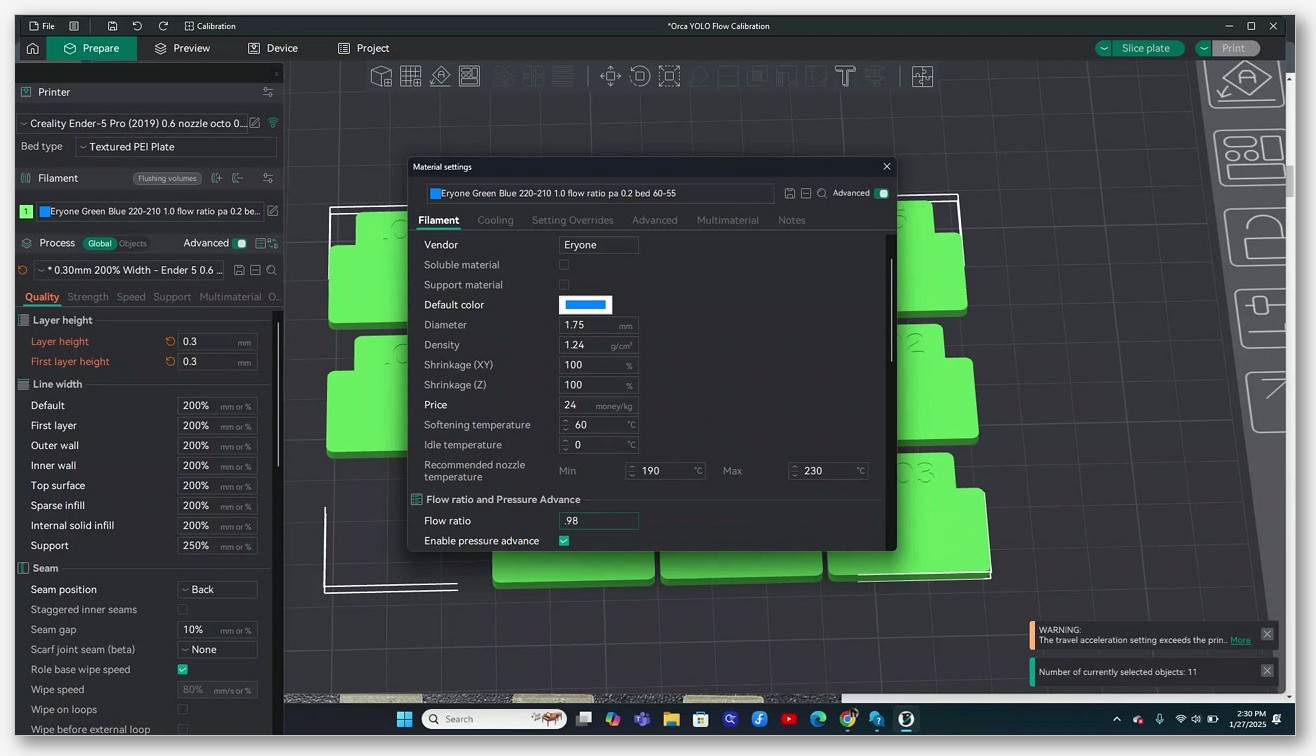
- Flow Ratio. Base multiplier, default 1.0, sane range 0.94 to 1.05. Per-spool, not per-brand. OrcaSlicer wiki reference.
- Filament Diameter. Default 1.75. Override per-spool only if you have measured.
- Max Volumetric Speed. Bottom of the Cooling sub-tab inside Filament settings. mm³/s ceiling, by far the most underused setting in the whole slicer.
- Extra length on restart. Lives under Printer settings Extruder Retraction, but can be overridden per filament. mm of extra de-retraction prime after a travel move.
- Wipe distance. mm of wipe motion before retract fires. Too long and the start of the next line is starved.
Print settings tab
- Line width. Quality Line width. Default, First layer, Outer wall, Inner wall, Top surface, Sparse infill, Internal solid infill. A line width set narrower than the nozzle (for example, 0.38 on a 0.4 nozzle) will look like under-extrusion every time. Default for a 0.4 nozzle should sit around 0.42 to 0.45.
- Layer height. Below roughly 0.08 mm or above 75% of nozzle diameter, flow math gets weird. Stay inside that range unless you have a specific reason not to.
- Seam gap. Quality Advanced. Too high and the seam reads like under-extrusion at every Z transition.
Printer settings tab
- Retraction Length, Retraction Speed, Extra length on restart. Extruder Retraction. Wiki reference.
- Travel distance threshold. Controls when retraction fires. Set too high on a fast print and you get strings; set too low and you over-retract every short move, causing prime starvation at the next line start.
Field names have been stable across 2.3.0, 2.3.1 and 2.3.x. If you are on Bambu Studio and translating, OrcaSlicer kept the PrusaSlicer-style naming, so cross-reference accordingly.
Flow ratio calibration: four methods
OrcaSlicer ships four flow-calibration workflows. They are not interchangeable. The math is different between YOLO and Pass 1/2, and getting that wrong is one of the most common reasons I see “I calibrated and now my print is worse” posts on Reddit. I will walk all four, then tell you which to pick.
Cross-link: the full method-by-method walkthrough lives in our dedicated flow rate calibration guide. The summary below is enough to fix under-extrusion in 90% of cases.
Method A: Single-perimeter cube (the legacy manual method)
Slice a 20 x 20 x 10 mm cube as vase mode, single perimeter, 0% infill, 0 top and 0 bottom. Print it. Measure wall thickness with digital calipers at four spots and average them. Expected wall equals nozzle diameter times your line-width multiplier (so 0.42 mm for a 0.4 nozzle at default line width).
New flow ratio = old flow ratio x (expected / measured).
Objective, measurement-based, works on any printer, no proprietary plates. Downside: needs good calipers and a level bed. I run this on the Voron because I trust calipers more than my eyes on a textured PEI plate.
Method B: Pass 1 + Pass 2 (the OrcaSlicer built-in legacy method)
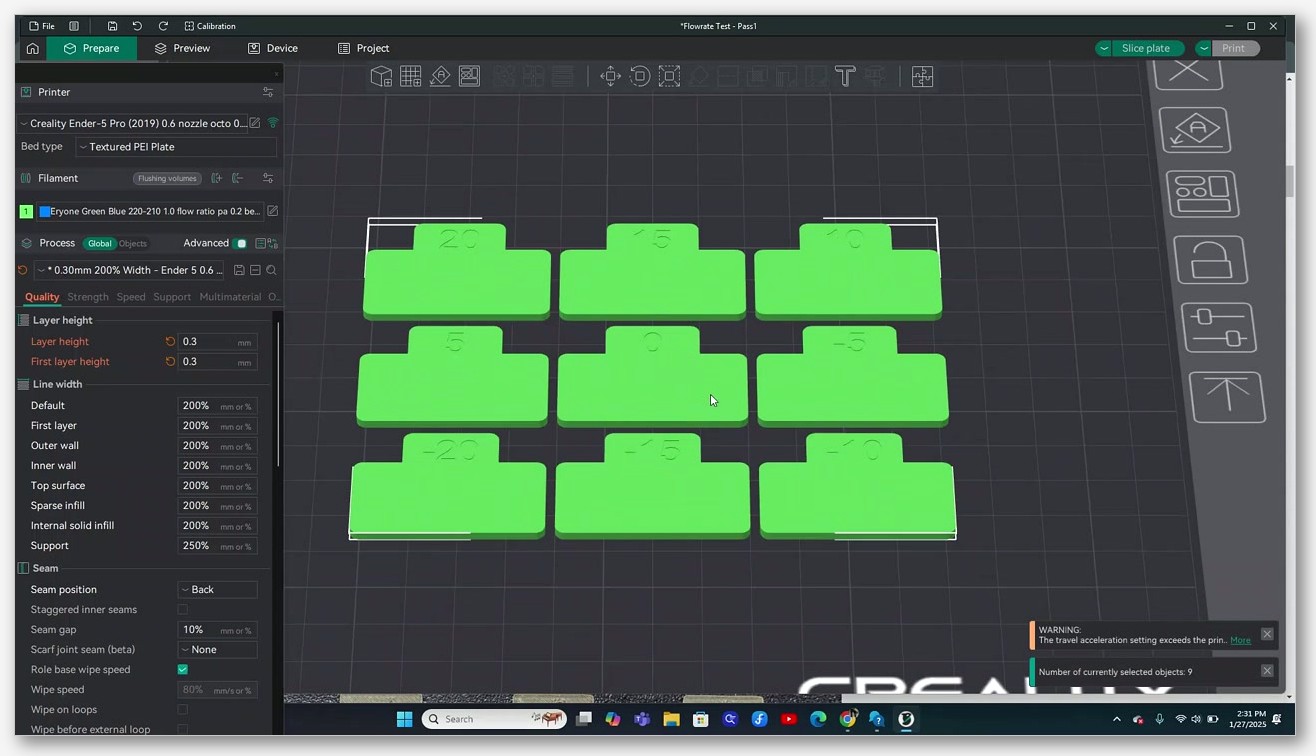
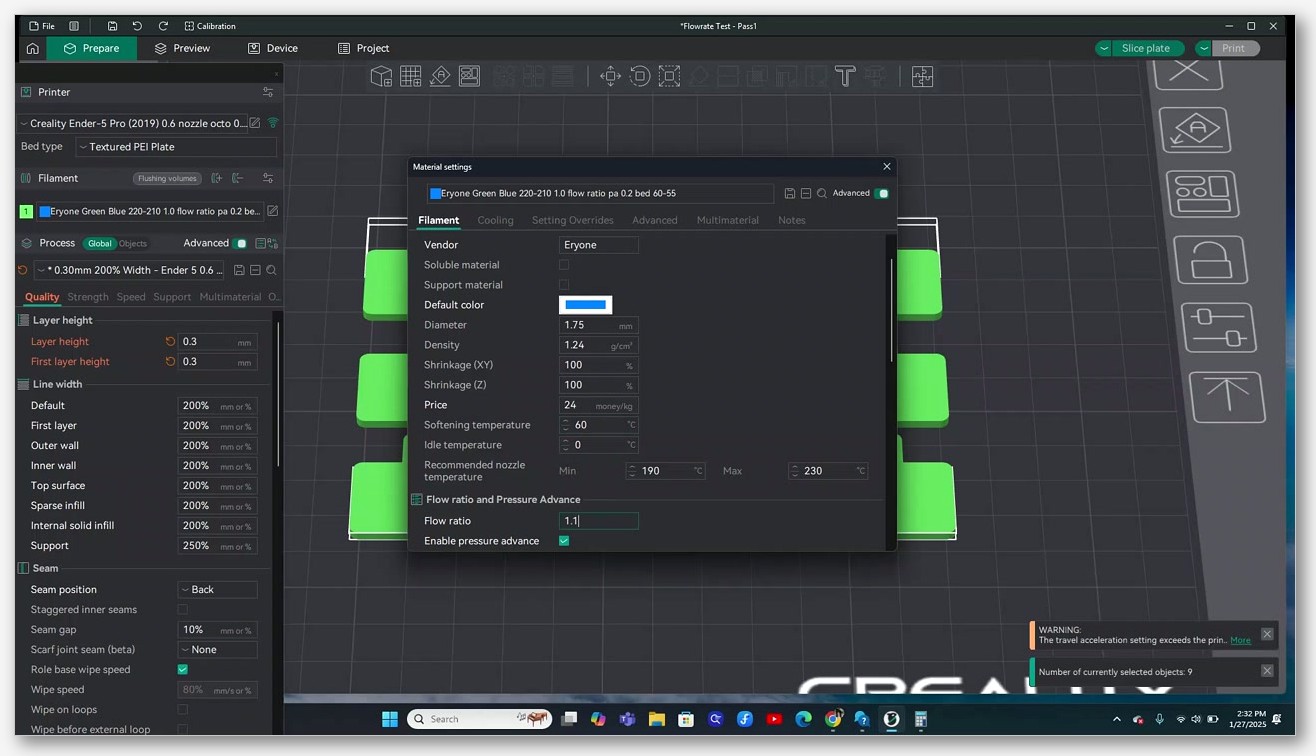
Calibration menu, Flow Rate, Pass 1. The slicer generates nine small blocks labelled +20 down to -20 in 5% steps. Print the plate, side-light the tops with a phone torch, pick the block with the smoothest top, no pinholes, no over-extruded ridges.
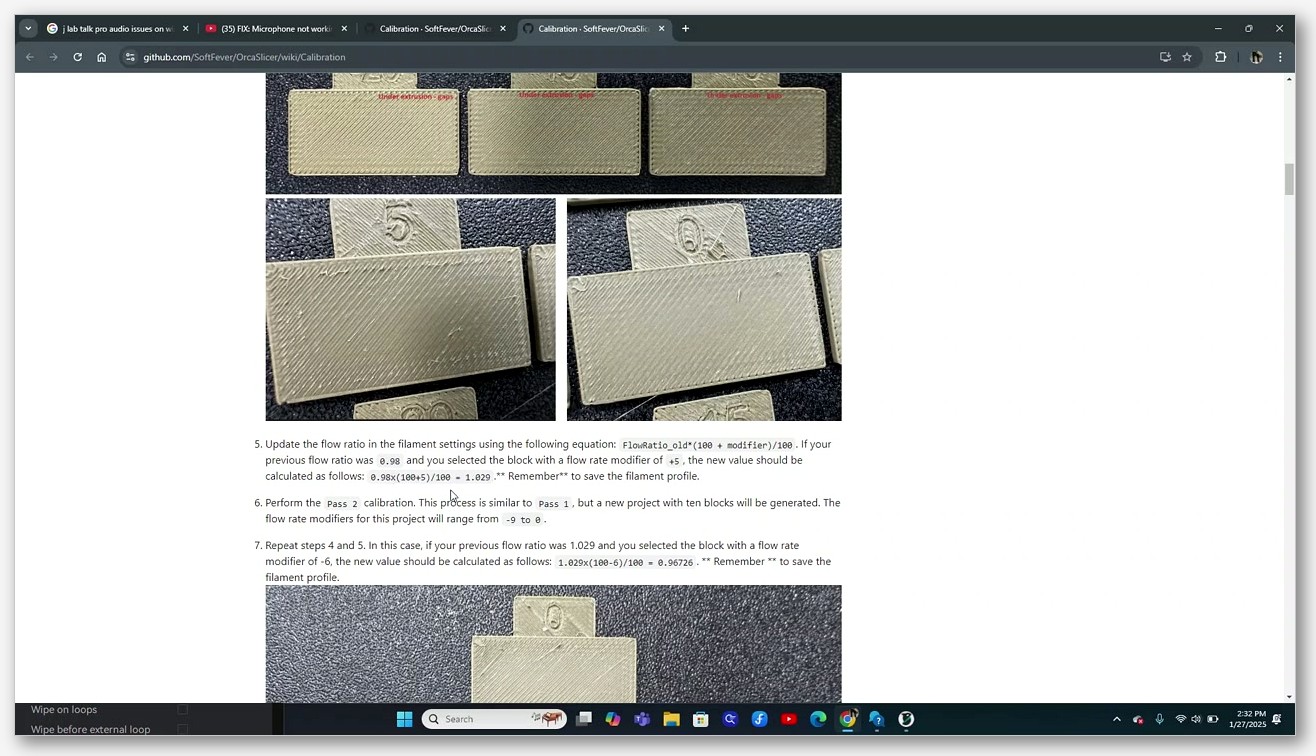
Apply: FlowRatio_new = FlowRatio_old x (100 + modifier) / 100. If your old flow ratio was 0.98 and you picked the +5 block, new ratio = 0.98 x 10⁵/100 = 1.029. Save the filament profile.
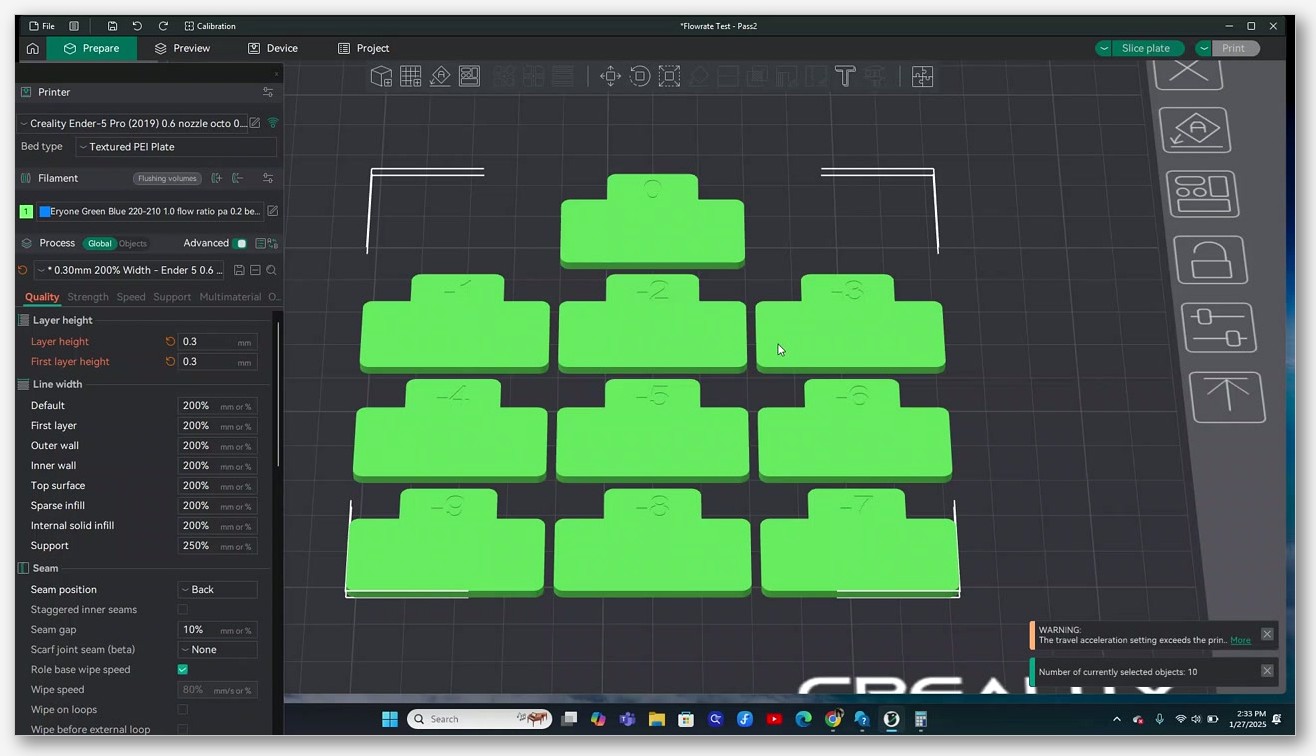
Then run Pass 2. New plate with ten blocks running from -9 to 0 in 1% steps. Pick the cleanest, apply the same multiplicative formula. Final number is typically accurate to about plus or minus 0.005. SoftFever wiki reference.
Method C: YOLO (the newer single-pass method)
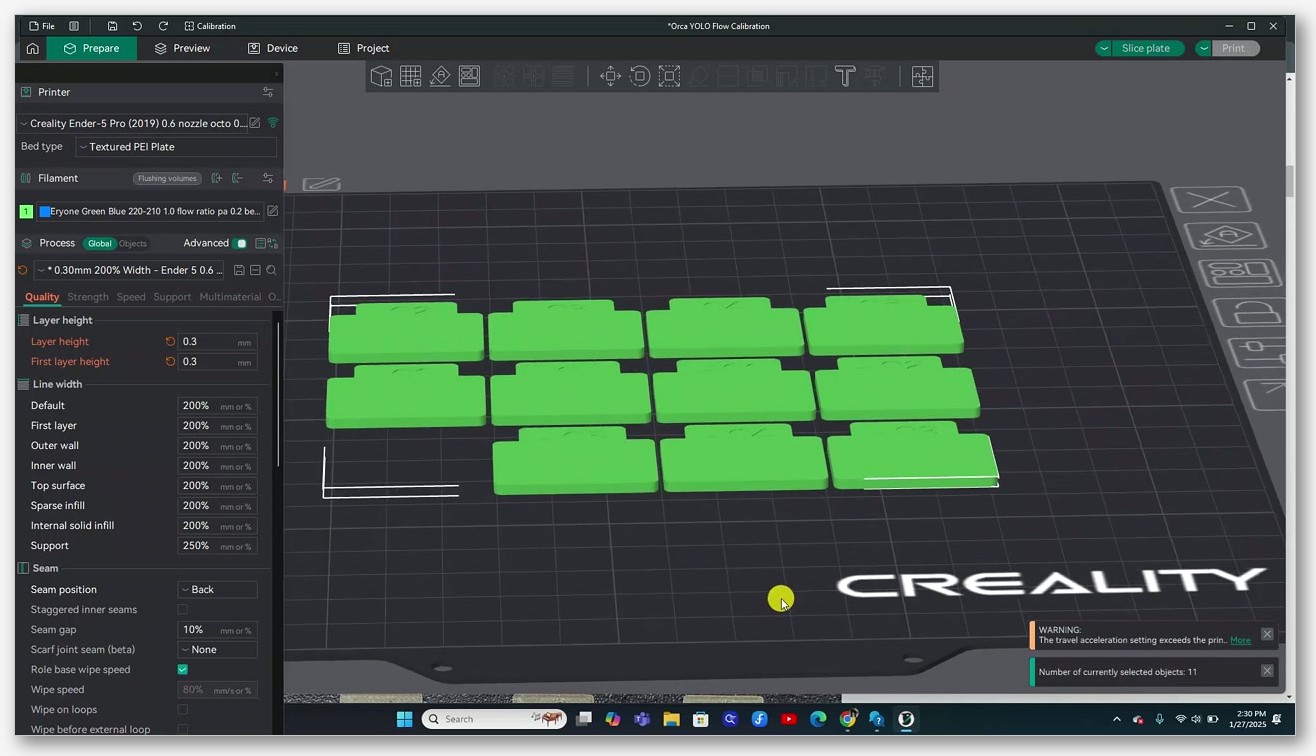
Calibration menu, Flow Rate, YOLO (Recommended). Single print, eleven blocks, range -0.05 to +0.05 in 0.01 steps.
This is the gotcha that catches everyone: the math is additive, not multiplicative. The formula is OldFlowRatio +/- modifier. So if your old ratio was 0.98 and you picked the +0.03 block, new ratio = 1.01. Save.
YOLO is one print, one math step, and it is the right choice for in-spec filament where you expect the answer to be within 5% of where you are. If the spool is way off and the right answer is outside the 0.05 range, YOLO cannot reach it and you should drop back to Pass 1/2. The method was introduced in OrcaSlicer PR #6479.
Method D: Archimedean (newest, 2.3.x)
A spiral-line variant added in recent releases. Each block prints a tight Archimedean spiral and you evaluate whether adjacent spiral arcs fuse cleanly or leave a visible line between them. Same additive math as YOLO. I find this one easier to judge on glossy filaments where YOLO blocks reflect light strangely.
How to actually evaluate the blocks
This is the part that loses people. Pull out a phone torch, kill the room lights, and hold the torch at maybe 10 to 15 degrees off the surface, parallel to the print. Pinholes pop visually. The best block has the smoothest top with no pinholes and no over-extruded ridges piling up at the edges. If two blocks look equally good, pick the lower flow ratio: it is safer downstream because higher flow tends to cause stringing and ooze problems that are harder to diagnose.
Iteration strategy
Calibrate generic flow ratio per material (PLA, PETG, ABS) once at the system filament level. Then create per-spool overrides only when a specific brand or colour visibly mis-extrudes. Do not chase four decimal places. Flow ratio drifts with temperature, with nozzle wear, with humidity, and trying to nail it to 1.0023 versus 1.0028 is a Saturday lost to noise.
The Bambu-specific warning
On Bambu Lab printers, do not use the printer’s built-in “Flow Dynamics Calibration” thinking it will fix flow ratio. That calibrates pressure advance, not flow rate. They are different physical phenomena. Run OrcaSlicer’s flow calibration separately even if you have already run the Bambu on-printer routine. Bambu community thread on this exact confusion.
Max Volumetric Speed (MVS) deep-dive
Max Volumetric Speed is the single most under-explained setting in OrcaSlicer and the cause of more “but I just bumped my speeds” under-extrusion than any other. If your prints look starved only when you crank speed, this is your section.
Definition
MVS is the maximum mm³ of melted plastic your hotend can deliver per second. Not millimetres of filament per second, not mm/s of toolhead motion, mm³ of melt per second. The formula the slicer uses to translate is brutally simple:
volumetric flow = layer_height x line_width x print_speed
If your hotend tops out at 12 mm³/s and you slice at 300 mm/s with 0.2 mm layer height and 0.42 mm line width, that is 25.2 mm³/s requested. The hotend will deliver 12. The print will be 50% under-extruded on perimeters, and nothing in flow ratio, retraction, or nozzle cleanliness will fix it because the limit is thermal, not mechanical.
OrcaSlicer respects the MVS ceiling when slicing: it will throttle print speed down so volumetric flow stays at or below your configured cap. The catch is that if you leave MVS at a too-high default, the slicer never throttles, and you get under-extrusion at speed without warning.
Realistic MVS by hotend (approximate ranges)
| Hotend | PLA (mm³/s) | PETG (mm³/s) | ABS (mm³/s) | Source |
|---|---|---|---|---|
| E3D V6 (stock 0.4) | ~11.5 (advertised 15) | ~8 | ~10 | E3D / Prusa community |
| E3D Volcano | ~24-26 | ~14-16 | ~18 | E3D / community |
| E3D SuperVolcano | up to ~100+ | varies | varies | E3D marketing |
| E3D Revo (varies by nozzle) | see calculator | n/a | n/a | E3D Revo calculator |
| Bambu X1/P1 stock hotend | ~21-25 PLA Basic | ~8-12 | ~12-15 | Bambu Lab wiki |
| Bambu CHC (high flow) | up to ~32 PLA Basic (peak) | lower, see caveat | lower | Bambu wiki, see caveat below |
| Bambu H2D / H2C / H2S 0.4 HF | up to ~35 PLA Basic | n/a | n/a | Bambu Lab specs |
Two huge caveats that nobody seems to print on the side of the box.
First, the 32 mm³/s figure for the Bambu CHC hotend is a peak number for PLA Basic. It does not sustain at higher-temperature filaments. PETG and ABS rates on a CHC drop meaningfully, and nylon or PC are slower again. Do not use 32 as your blanket MVS for all materials. If your CHC is set to 32 and you switch to PETG, you will under-extrude.
Second, the “up to 15 mm³/s” figure for the E3D V6 is marketing. Real-world sustainable on PLA is closer to 11.5 mm³/s, lower on harder-to-melt materials. The Prusa Knowledge Base and Ellis Print Tuning Guide both back this up.
Nozzle diameter matters too. A 0.6 mm nozzle on the same hotend can typically push 30 to 50% more mm³/s than a 0.4 mm because the melt zone exit is bigger. If you swapped to a 0.6 to get fewer perimeters and now your prints look great, congratulations, you accidentally fixed your MVS problem.
Sources to actually cite when someone asks: Bambu Lab wiki on volumetric speed, Prusa Knowledge Base on MVS, Ellis Print Tuning Guide on determining max flow.
How to calibrate MVS in OrcaSlicer
Calibration menu, More, Max flowrate (sometimes labelled Max volumetric speed). Default tower starts at 5 mm³/s and ends at 20 mm³/s in 0.5 mm³/s steps. For a high-flow hotend like a Volcano, CHC, or Revo HF, push the end to 30-35.
Print the tower. Watch and listen. The failure mode is one of two things: visible under-extrusion (gaps, missing material, layer splitting) starts at a specific height, and/or the extruder begins audibly clicking as it skips. Either signal tells you the same thing: the hotend ran out of thermal headroom at that flow rate.
After printing, open the Preview tab with the Flow colour scheme on and scroll to the height where defects appear. That flow rate is your effective ceiling. Set MVS to 90% of that ceiling in Filament settings, Cooling, Max volumetric speed. Save.
Why exceeding MVS causes under-extrusion (the mechanics)
Filament passes through the melt zone faster than it can fully liquefy. Backpressure rises because the partially-molten core resists motion. The extruder responds by either skipping steps (audible click) or grinding the filament (silent failure where the gear cuts a flat into the side and slips). Either way, less plastic exits the nozzle than the slicer commanded. The fix is to slow down or to upgrade the hotend, not to clean the nozzle. This is fundamentally different from a clog and the diagnostic path is different too. Our dedicated MVS guide walks the tower print in more depth.
Hardware diagnostic workflow
After settings are eliminated, walk through hardware. The order below is fastest-and-cheapest first. Do not jump ahead.
Cold pull (atomic pull)
Costs nothing, takes 15 minutes, and resolves the bulk of partial-clog under-extrusion cases I see.
- Heat the hotend to printing temp. 220 C for PLA, 240 C for PETG. If a Bambu, use the temp the wiki recommends per material.
- Push 20 to 30 cm of cleaning filament (nylon works, even PLA will do) through manually until it extrudes clean.
- Drop the temp. ~90 C for PLA. ~85 C for PETG. Bambu wiki has specifics per material.
- The moment you hit the target cool temp, pull the filament out with a firm, steady yank. Not a snap, a yank. The plastic should still be soft enough to come out as one piece but cool enough to retain the nozzle’s internal shape.
- Look at the tip. A clean pull leaves a sharp bullet matching the nozzle bore. Black flecks, discoloured streaks, or a wonky tip means there is still contamination in there.
- Repeat 3 to 5 times until the pull comes out clean.
Bambu has model-specific guidance: X1 nozzle clog wiki and P1S cold pull wiki. For general technique, All3DP has a solid walkthrough.
Extruder gear inspection
Open the extruder cover. Look at the drive gear teeth: sharp and clean, or packed with filament dust. Dust between teeth means the gear is slipping and chewing material instead of feeding it. Clean with a brass brush. Never a steel brush, steel can wear the gear teeth.
Look also for a worn flat spot on one side of the gear. That is years-of-use wear and the only fix is replacement. Bambu hardened steel extruder gears wear slower but they are not immune, especially after long carbon-fibre runs.
Filament dust under the printer
The smoking gun. A pile of crumbs on the bench underneath the extruder means the gear is actively grinding. If you find this and the prints are starved, the diagnostic is over, fix the extruder.
PTFE check
Disconnect the PTFE at the hotend end. Inspect the end face. If it is chamfered, melted, or frayed, cut a fresh square end with a PTFE cutter or a very sharp blade. Reinsert fully so it bottoms out at the nozzle. Even a 1 to 2 mm gap between the PTFE end and the nozzle is enough to cause backflow leaks and persistent clogs.
For Bambu printers, the hotend-internal PTFE liner is consumable. Replace every 6 to 12 months under normal use, sooner with abrasive filaments. Bambu’s PTFE replacement wiki has the model-specific steps.
Heatbreak thermal isolation
Touch the heatsink fins above the heatbreak while the hotend is at temp. They should be cool. Hot heatsink means your part-cooling fan or heatbreak fan has failed (or never came on at all), heat is creeping up the throat, filament is melting where it should still be solid, and you have a soft-melt-zone clog forming. All-metal hotends are especially sensitive to this and the symptom always reads as under-extrusion.
Filament-specific gotchas
Each material under-extrudes a little differently. Short version below; deeper material guides linked.
PETG
The slippery surface means the extruder gear loses grip easily. Most common failure: gear teeth grind a flat into the filament, then it slips for the rest of the print. Fix is to clean the gear, slightly increase tension, drop print speed to the 35 to 45 mm/s range, and raise nozzle temp 5 to 10 C above where you would print PLA. PETG also sticks aggressively to brass nozzles, so cold pulls are extra effective when a PETG print starts under-extruding mid-job. Our PETG settings guide has the full profile. Bambu PETG-HF specifically has a documented calibration thread on the Bambu Lab community.
TPU and other flexibles
TPU buckles inside the extruder under any backpressure. Speed must be very low: 20 to 30 mm/s for 95A shore, slower (4 to 15 mm/s) for softer 85A and 70A. MVS should be capped low, 6 to 10 mm³/s is the safe range. Bowden setups with long tubes are borderline unprintable on TPU because the filament compresses inside the tube and the response is mush. Use direct drive for anything softer than 95A. TPU settings guide.
Carbon fibre and glass fibre composites
Brass nozzles wear fast on abrasives. CNC Kitchen documented significant brass wear at low filament tonnage on CF-loaded materials. A worn nozzle has a wider effective bore, so the slicer’s volume math is off and you under-extrude even with a clean machine, calibrated flow, and adequate MVS. Fix is to swap to hardened steel, tungsten carbide, or ruby before you start a CF run, not after. CF filaments guide.
Wood, glow, glitter (filler-loaded)
Particles plug the nozzle entrance over time, especially after a pause where the nozzle sits hot with filler-loaded plastic in it. Glow filaments contain phosphor, which is itself abrasive (same nozzle wear story as CF). Some wood blends jam at nozzles smaller than 0.5 mm entirely. Use 0.6 mm minimum, hardened steel for glow and glitter, and run cold pulls more often than you think you need to.
Nylon and PC
Hygroscopic to an absurd degree. A spool can become unprintably wet in 24 hours of room exposure. Always dry, always print from a heated/dry box if you have one. Expect MVS around 5 to 8 mm³/s for nylon; these materials are viscous and high flow is just not in the cards.
The 2.3.1 thin-wall regression (Issue #11394)
If you upgraded to OrcaSlicer 2.3.1 and suddenly your previously-fine 1 to 2 mm thin walls show gaps between perimeters, this is not your printer. It is GitHub Issue #11394. Adjacent perimeters on thin walls behave like separate shells rather than fusing the way they did in 2.3.0. The workaround at the time of writing is to roll back to 2.3.0 for thin-walled prints, or to manually increase line width to force the perimeters to overlap. Track the issue for the fix; do not waste a Saturday on flow calibration if this is your case.
Common false fixes that waste a Saturday
The diagnostic ladder above is ordered for a reason. Here are the moves I see beginners make that almost always make things worse before they make them better.
- Cranking flow ratio to 1.05 or 1.10 without diagnosing root cause. If the real problem is wet filament or a partial clog, raising flow masks the symptom for a print or two and the underlying problem gets worse. Flow ratio is the last adjustment, not the first.
- Adding more top shell layers because the top surface has pinholes. More starved layers do not close pinholes. Fix the upstream flow problem.
- Raising temp 20 C to “melt better.” A 5 to 10 C bump for high-speed prints is fine. A 20 C bump cooks the filament, accelerates carbon buildup in the nozzle, and creates the next clog you will be cold-pulling out in two weeks.
- Replacing the nozzle before cold-pulling. A new nozzle on a printer with a partial clog still partially clogs immediately. Cold pull first, then replace if the pulls keep coming out dirty.
- Setting MVS to the marketing number on the hotend’s spec sheet. The 32 for CHC, the 15 for V6, the 35 for the H2D HF, those are peak figures for PLA Basic, not sustained values for whatever you actually print. Run the tower.
- Using Bambu Lab’s on-printer Flow Dynamics Calibration thinking it fixes flow ratio. It calibrates pressure advance. Different parameter, different problem. Run OrcaSlicer’s flow calibration too.
If you are still stuck after the ladder, sanity-check against the full troubleshooting guide, drop a comment with photos in the relevant OrcaSlicer Discord channel, and check the issue tracker for recent regressions matching your version.
FAQ
What flow ratio should I use for PLA in OrcaSlicer?
There is no single right answer because flow ratio is per spool, not per material. The default 1.0 is the right starting point; calibrate from there using YOLO or Pass 1/2. Most in-spec PLA spools end up between 0.96 and 1.02 after calibration. If a guide tells you to “set PLA to 0.98,” that guide is wrong for your next spool.
Is YOLO or Pass 1/2 better for flow calibration?
YOLO is faster (one print, additive math) and works well for in-spec filament. Pass 1/2 has a wider range and a finer second pass, so it is better when the spool is meaningfully off-spec or you want maximum precision. Start with YOLO; if the right answer is outside the +/- 0.05 range it offers, drop back to Pass 1/2.
Why are my prints under-extruding only at high speed?
Almost always Max Volumetric Speed. The hotend cannot melt plastic fast enough. Run the MVS tower (Section 6) and cap your filament’s MVS at 90% of the measured ceiling.
I cold-pulled three times and the tip still looks dirty. Now what?
Two possibilities. Either the contamination is deeper than the cold pull reaches (in which case a full nozzle replacement is warranted, and on a Bambu the hotend-internal PTFE liner may also need replacing), or your heatbreak fan has failed and is allowing heat creep that re-clogs the soft-melt zone almost as soon as you clear it. Check the fan first; nozzles are cheaper than a fresh diagnosis path.
Does humidity really cause under-extrusion?
Yes, more than people credit. Filament absorbs water; water flashes to steam at hotend temp; the steam disrupts the melt and causes micro-voids in the extrudate. PETG, TPU, nylon, and PC are the worst offenders. PLA is more forgiving but a spool left open for a wet month will still print noticeably worse than a dry one. Dry the spool before assuming anything else is wrong.
Should I recalibrate flow ratio after switching colours of the same filament?
If you are inside the same brand and the same material formulation, usually not. If you see visible under- or over-extrusion on the first test print, run YOLO. Different dyes and pigments can shift the effective flow ratio by a percent or two, which is enough to matter on tight prints.
I followed all of this and my prints are still under-extruding. What did I miss?
Check filament diameter with calipers in five places and average. A 0.05 mm diameter error is roughly 6% volumetric error, which feels exactly like under-extrusion. If the average is not 1.75, enter your measured value in Filament settings, Diameter, and reslice.
How often should I recalibrate flow ratio?
Once per new spool, once per material formulation change (so a new brand of PLA, not a new colour of the same brand), and any time the season changes meaningfully in your print room. The full troubleshooting guide has a longer cadence recommendation.
Wrapping up
Under-extrusion is one of those problems that looks like a hundred different things and turns out, ninety percent of the time, to be one of three causes: wet filament, partial clog, or miscalibrated flow against an off-spec spool. Climb the ladder in order. Do not crank flow ratio first. Run the cold pull before you order a new hotend. Calibrate MVS once and the speed-print problems vanish.
If you are running an older OrcaSlicer build, the latest 2.3.x release is on the official GitHub releases page (note: orcaslicer.net is a third-party content site, the official downloads come from the GitHub repo, not from us). Once you are up to date, work through Section 3, run a YOLO flow plate, run an MVS tower, and you will be looking at clean perimeters within an evening. Drop a comment if the gaps survive all that and I will help dig into the next step.